EducationSoftwareStrategy.com
StrategyCommunity

Knowledge Base

Product

Community

Knowledge Base

TopicsBrowse ArticlesDeveloper Zone

Product

Download SoftwareProduct DocumentationSecurity Hub

Education

Tutorial VideosSolution GalleryEducation courses

Community

GuidelinesGrandmastersEvents
x_social-icon_white.svglinkedin_social-icon_white.svg
Strategy logoCommunity

© Strategy Inc. All Rights Reserved.

LegalTerms of UsePrivacy Policy
  1. Home
  2. Topics

KB46372: "Invalid Picture" error is thrown when attempting to start MicroStrategy Developer 9.4.x - 10.x in Windows


Stefan Zepeda

Salesforce Solutions Architect • Strategy


This technical note outlines an error that prevents user from starting MicroStrategy Developer.

SYMPTOM:
Users may see the "Invalid Picture" error thrown when attempting to launch Strategy Developer in Windows:
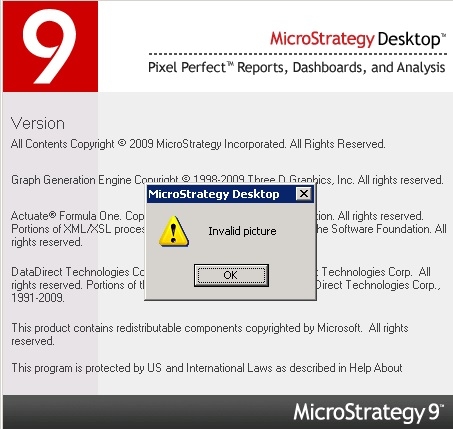
 

ka02R000000kcNKQAY_0EM440000002CRZ.jpeg

 
CAUSE:
This error is caused by a lack of available space on the user's hard disk to properly launch the platform.
 
ACTION:
To remedy the issue, simply clear up some active space on the hard drive to allow Strategy to properly launch.


Comment

0 comments

Details

Knowledge Article

Published:

May 4, 2017

Last Updated:

May 4, 2017