EducationSoftwareStrategy.com
StrategyCommunity

Knowledge Base

Product

Community

Knowledge Base

TopicsBrowse ArticlesDeveloper Zone

Product

Download SoftwareProduct DocumentationSecurity Hub

Education

Tutorial VideosSolution GalleryEducation courses

Community

GuidelinesGrandmastersEvents
x_social-icon_white.svglinkedin_social-icon_white.svg
Strategy logoCommunity

© Strategy Inc. All Rights Reserved.

LegalTerms of UsePrivacy Policy
  1. Home
  2. Topics

KB46381: "Validation Error: This field is required" error message appears when clicking in and out of a transaction text field that is not required in MicroStrategy Web 9.4.1 Hotfix 2.


Community Admin

• Strategy


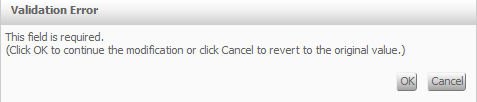
In MicroStrategy Web 9.4.1, when a user sets a minimum and maximum value for a transaction text field it acts as a required field even though it is not set as one. When clicking in it and then out of it, if no value has been entered, the following message appears: Validation Error. This field is required.

SYMPTOM: 
In Strategy Web 9.4.1, when a user sets a minimum and maximum value for a transaction text field it acts as a required field even though it is not set as one. When clicking in it and then out of it, if no value has been entered, the following message appears:
ka04W000000OaW7QAK_0EM4400000026G6.png


Validation Error
This field is required.
(Click OK to continue the modification or click Cancel to revert to the original value.)
  
STEPS TO REPRODUCE:

  • Navigate to Shared Reports > Strategy Platform Capabilities > Strategy Transaction Services.
  • Open "Item Order Form" in design mode.
  • Right click on the "Units Requested".
  • Click on "Configure Transaction".
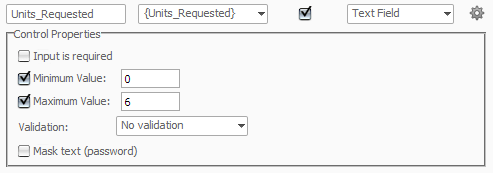
  • Edit the "Unites Requested" control style and set it to text field.
  • Then set the min and max values, as seen below.
     
ka04W000000OaW7QAK_0EM4400000026G8.png
  • Note: The field for validation is set to "No validation."
  • Run in Express Mode.
  • Click in the "Units Requested" text box area and then click out without enter any value.
  • An error message should pop up stating the field is required.

CAUSE:
This is a known issue with Strategy Web 9.4.1. The message appears because of the condition comparing the null value that occurs from clicking in and out, against the minimum and maximum values set in the control properties. Because null doesn't satisfy the condition, a message appears. The error message stating that the field is required is incorrect and misleading. 
 
ACTION:
Contact Strategy Technical Support for an update on this issue.
 
WORKAROUND:
Upon receiving the error message click the 'Cancel' button. The field will no longer be required, and the user can still submit the transaction without a modification to this field.
KB46381


Comment

0 comments

Details

Knowledge Article

Published:

June 2, 2017

Last Updated:

December 28, 2018