SYMPTOM:
A user searches for an attribute element using a pull down list selector in a Transaction Services Document. The pull down selector will show search results. However, regardless of what element is selected by the user, the pull down selector will always display the first element of the search result as the selection made by the user, in Strategy Analytics Enterprise 9.4.1.
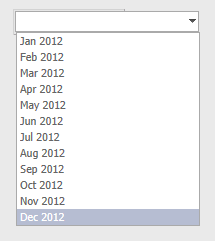
The image below shows the selector returning all attribute elements for the Month attribute. At this point, no search has been made:
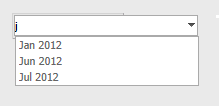
The user then types in the letter "j" to perform a search. The following results appear:
The user then selects the third option, "Jul 2012", as shown below:
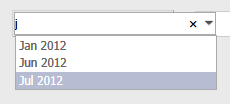
Instead of displaying "Jul 2012" as the selection made, the first element from the search results, "Jan 2012", is displayed in its place:

Note: For information on how to clear the search result refer to tech note KB46005 "A pull down list selector does not clear the search results after searching once in a transaction services document in Strategy Web 9.3.1 HF1"
STEPS TO REPRODUCE:
Follow these steps in a Strategy Tutorial Project:
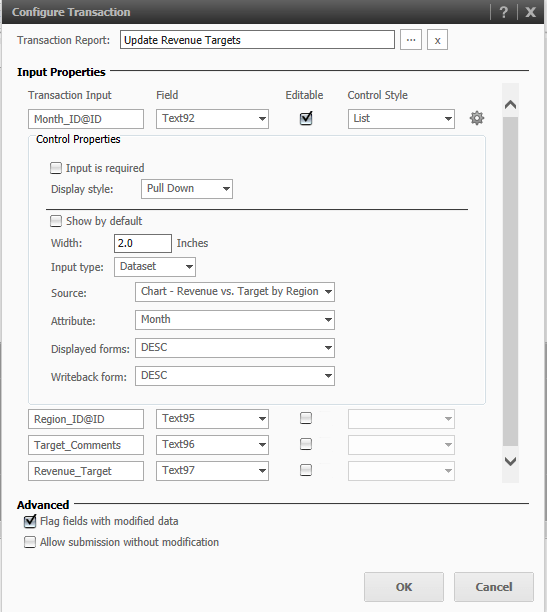
CAUSE:
This is a known issue in Strategy Web 9.4.1.
ACTION:
This issue has been fixed in Strategy Web 9.4.1 Hotfix 6. Take advantage of upgrading for a fix.
WORKAROUND:
If the list of elements is not too long, avoid using the search and manually select the element.
By manually selecting "Jun 2012", as shown below, the correct element is displayed.
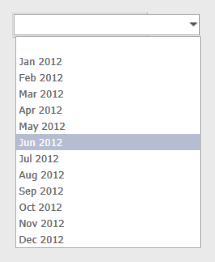
And the pull down selector displays the correct selection, as shown below:

KB46382
