EducationSoftwareStrategy.com
StrategyCommunity

Knowledge Base

Product

Community

Knowledge Base

TopicsBrowse ArticlesDeveloper Zone

Product

Download SoftwareProduct DocumentationSecurity Hub

Education

Tutorial VideosSolution GalleryEducation courses

Community

GuidelinesGrandmastersEvents
x_social-icon_white.svglinkedin_social-icon_white.svg
Strategy logoCommunity

© Strategy Inc. All Rights Reserved.

LegalTerms of UsePrivacy Policy
  1. Home
  2. Topics

KB46406: When creating a Filter or Security Filter on a Big Decimal field (more than 10 digits) in MicroStrategy Command Manager 9.x, a value of -2147483648 will be saved as filter condition instead of the Big Decimal value


Stefan Zepeda

Salesforce Solutions Architect • Strategy


When creating a Filter or Security Filter on a Big Decimal field (more than 10 digits) in MicroStrategy Command Manager 9.x, a value of -2147483648 will be saved as filter condition instead of the Big Decimal value

SYMPTOM:
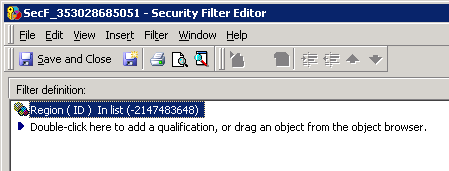
In Strategy 9.x, after creating a security filter or a filter via Strategy Command Manager with an ID that exceeds 10 digits, it is noticed that the filter is saved with the value of  -2147483648 as shown below:


ka02R000000kZgeQAE_0EM440000002CQ8.png


STEPS TO REPRODUCE THE ISSUE:
Create a security filter or a filter with an ID longer than 10 digits as shown below:
 
CREATE SECURITY FILTER "SecF_353028685051" FOLDER "\Project Objects\MD Security Filters\" IN PROJECT "Strategy Tutorial" EXPRESSION "@ID IN(1105353530021)";
 
 
CAUSE:
An ID with more than 10 digits is not parsed as a BIG DECIMAL automatically. In order to make the expression text to be parsed correctly as Big Decimal, the character '#' (pound-sign, hash) needs to be used before and after the long number.
 
 
ACTION:
Change the syntax by adding '#' before and after the ID as shown below:
 
CREATE SECURITY FILTER "SecF_353028685051" FOLDER "\Project Objects\MD Security Filters\" IN PROJECT "Strategy Tutorial" EXPRESSION "@ID IN(#1105353530021#)";


Comment

0 comments

Details

Knowledge Article

Published:

June 8, 2017

Last Updated:

June 8, 2017