EducationSoftwareStrategy.com
StrategyCommunity

Knowledge Base

Product

Community

Knowledge Base

TopicsBrowse ArticlesDeveloper Zone

Product

Download SoftwareProduct DocumentationSecurity Hub

Education

Tutorial VideosSolution GalleryEducation courses

Community

GuidelinesGrandmastersEvents
x_social-icon_white.svglinkedin_social-icon_white.svg
Strategy logoCommunity

© Strategy Inc. All Rights Reserved.

LegalTerms of UsePrivacy Policy
  1. Home
  2. Topics

KB4641: How to set up a Compound Key for an attribute in MicroStrategy Developer 9.4.x-10.x?


Stefan Zepeda

Salesforce Solutions Architect • Strategy


This knowledge base article documents the process of creating compound keys for attributes in MicroStrategy Developer 9.4.x-10.x.

A compound key attribute is an attribute whose primary key is made up by the combination of two or more columns. The multiple columns are joined with other attributes, typically in a many-to-many relationship.
To create a compound key, users must create multiple attribute forms, group them together and set the form group as the key for the attribute.
Use the same steps as specified in the help menu:
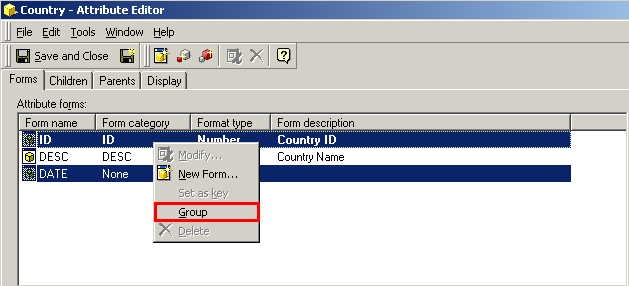
  • Open attribute editor (right-click on attribute and select 'Edit')
  • Select the forms that will make up the compound key
  • From the 'Edit' menu, choose 'Group'
ka02R000000kccSQAQ_0EM440000002GI2.jpeg
  • NOTE: Modifying the key form will trigger required updates when saving. This may make related application objects (reports, filters and metrics) unusable.
     
  • Click on 'Yes' to continue, when prompted, in a dialog box, to confirm this action
  • Save the changes.
  • Choose 'Update Schema' from the Schema menu

IMPORTANT NOTES:

  • To view the changes in the project, users must update the schema.
  • All members of a compound key must be part of the same form category.
  • Only one form or form group can be set as a key. If users set a new form as the key, it removes the key from the current location.
  • Users cannot delete a form group while it is set as key. They must, first, set another attribute form as the key.

Please refer to the Project Designer Guide for additional information on compound keys.


Comment

0 comments

Details

Knowledge Article

Published:

April 10, 2017

Last Updated:

April 10, 2017