SUMMARY:
This technote describes a current defect in Strategy Web 9.4.1 where when a Compound Attribute containing a Date Format ID is used as a dynamic textbox on a Flash document, the formatting will not show correctly when viewed in Web.
SYMPTOM:
This issue can been seen when running a Flash Document with a Compount ID attribute where one ID is a Date format. The ID in question wil show as a total from the data 1/1/1900 instead of the correct DD/MM/YYY format.
STEPS TO REPRODUCE:
1) Define an attribute to have a form that consist of two columns. One of these columns needs to be an 'Date/Time' datatype. In this example, Quarter_Date and Quarter_Desc were used.
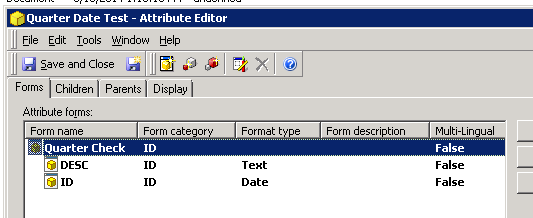
2) Define a report or cube to use as a dataset.

3) Create a document off of new dataset and place the newly created attribute on the document as a dynamic textbox.

4) Execute the document in Flash mode.

Users will see the value displayed is total days from 01/01/1900.
CAUSE:
This issue has been classified as a Defect In Strategy Web 9.4.1.
ACTION:
This issue has been addressed with Strategy 9.4.1 hotfix 3. Upgrade to take advantage of the fix.
WORKAROUND:
This issue does have a workaround by expliciting defing the attribute form that should be formatted correctly.
1) This first step is to explicitely define the forms, such as {}:{}.

2) The second step to define the formatting of the textbox to be a 'Date' format in 'Advanced Formatting' by executing the document in 'Editable' mode.
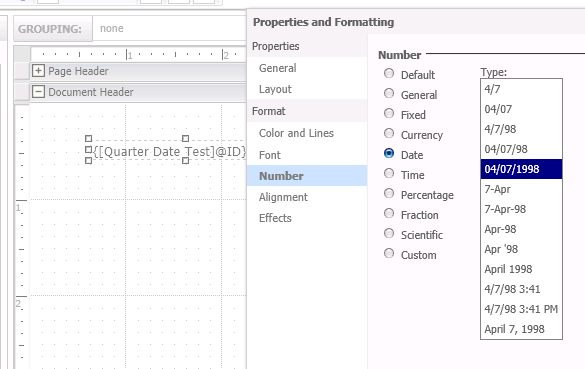
3) The third step is to execute the document in Flash mode.

Users will see that the Forms are both shown correctly.
TO LEARN MORE:
To learn more regarding Compound Attributes, please see Chapter 7: Attributes with multiple ID columns: Compound attributes in the Project Design Guide.
You can also refer the following article for more information:
KB14575: Trying to sort compound attributes results in erratic behavior in Microstrategy Desktop 9.x
