EducationSoftwareStrategy.com
StrategyCommunity

Knowledge Base

Product

Community

Knowledge Base

TopicsBrowse ArticlesDeveloper Zone

Product

Download SoftwareProduct DocumentationSecurity Hub

Education

Tutorial VideosSolution GalleryEducation courses

Community

GuidelinesGrandmastersEvents
x_social-icon_white.svglinkedin_social-icon_white.svg
Strategy logoCommunity

© Strategy Inc. All Rights Reserved.

LegalTerms of UsePrivacy Policy
  1. Home
  2. Topics

KB46432: "esriconfig.xml error. Object does not support property or method trim" error message is encountered when viewing an ESRI map widget in DHTML mode in MicroStrategy Web 9.4.1 with Internet Explorer 8.


Community Admin

Placeholder •


"esriconfig.xml error. Object does not support property or method trim" error message is encountered when viewing an ESRI map widget in DHTML mode in MicroStrategy Web 9.4.1 with Internet Explorer 8.

SYMPTOM:
Users will encounter the following error message when viewing an ESRI map in DHTML mode in Strategy Web 9.4.1 with Internet Explorer 8. This same document will render correctly in Flash mode. Below is the error message:

 

ka04W000000OaT3QAK_0EM4400000026EG.png

 
esriconfig.xml error. Object doesn't support property or method 'trim'
 
STEPS TO REPRODUCE:
In Strategy Tutorial:
  • Configure the ESRIConfig.xml file as per tech note KB45064.
  • Create a report with the Store attribute and the Profit metric.
  • Right click on the Store attribute > Attribute Forms.
  • Enable the "Longitude" and "Latitude" attribute forms to make them present in the report.
  • Create a document using this report as its dataset.
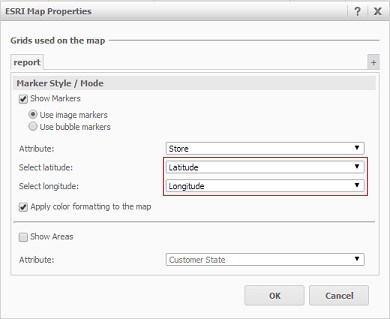
  • Insert an ESRI widget and configure the widget to show markers using "Latitude" as latitude and "Longitude" as longitude, like shown below.
ka04W000000OaT3QAK_0EM4400000026Dw.png
  • View this document in DHTML mode using Internet Explorer 8. Notice the error.

ka04W000000OaT3QAK_0EM4400000026Ds.png

 
CAUSE:
This is a known issue in Strategy Web 9.4.1.
 
ACTION:
This issue has been addressed in Strategy 9.4.1 HF3. Upgrade to this version to take advantage of the fix. 
 
WORKAROUND:
View this document in another supported browser. Firefox and Chrome do not experience the issue, neither do newer versions of Internet Explorer.
 
KB46432


Comment

0 comments

Details

Knowledge Article

Published:

June 2, 2017

Last Updated:

November 21, 2018
