EducationSoftwareStrategy.com
StrategyCommunity

Knowledge Base

Product

Community

Knowledge Base

TopicsBrowse ArticlesDeveloper Zone

Product

Download SoftwareProduct DocumentationSecurity Hub

Education

Tutorial VideosSolution GalleryEducation courses

Community

GuidelinesGrandmastersEvents
x_social-icon_white.svglinkedin_social-icon_white.svg
Strategy logoCommunity

© Strategy Inc. All Rights Reserved.

LegalTerms of UsePrivacy Policy
  1. Home
  2. Topics

KB46444: "JavaScript errors were encountered on this page" error message appears when switching view modes in Normal Screen Mode while having an element of a grid in Outline Mode selected in MicroStrategy Web 9.3.1.


Community Admin

• Strategy


This technical note describes an issue in MicroStrategy Web 9.3.1 where users receive the error message "JavaScript errors were encountered on this page" when switching view modes in Normal Screen Mode while having an element of a grid in Outline Mode selected. This issue has been addressed in MicroStrategy Web 10.x. Upgrade to take advantage of the fix.

SYMPTOM:
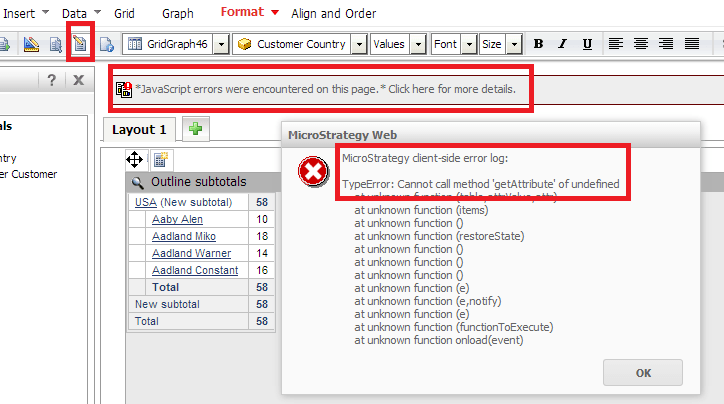
In Strategy Web 9.3.1, users may experience a JavaScript error when switching the View Mode while selecting an element of a grid in Outline Mode in a document, as shown below:
ka04W000000Oef3QAC_0EM4400000026Dr.png


*JavaScript errors were encountered on this page.* Click here for more details.


Strategy client-side error log:
TypeError: Cannot call method 'getAttribute' of undefined
This error only happens when "Show column headers" is disabled the the user is in Normal Screen Mode.
STEPS TO REPRODUCE:

  • Create a document with a grid report in Outline Mode.
  • In Properties & Formatting, disable "Show column headers."
  • Execute the document, which defaults to Interactive Mode in Full Screen.
  • Click "Restore Normal Screen Mode".
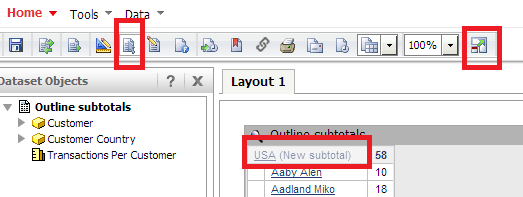
  • Click the outer-most attribute to select it, as shown below:
ka04W000000Oef3QAC_0EM4400000026Dk.png
  • With the attribute still selected, switch the View Mode to Editable Mode.
  • Notice the JavaScript error.

 
CAUSE:
This is a known issue in Strategy Web 9.3.1.
ACTION:
This issue has been addressed with Strategy 10. Upgrade to take advantage of the fix.
WORKAROUND:
To alleviate this issue, users can do either of the following:
Make sure nothing is selected when switching the document View Mode.
Do the manipulations in Full Screen Mode instead of Normal Screen Mode.


Comment

0 comments

Details

Knowledge Article

Published:

June 8, 2017

Last Updated:

June 8, 2017