SYMPTOM:
After migrating objects, users notice that some objects have been changed to a different language.
CAUSE:
This occurs when the default language does not contain a translation for the specific object(s) but other languages do. By design, Strategy expects there to be a translation for the default language. If for some reason the default language is blank, a different language will be populated into the default language. In choosing what language to populate into the default it will use the language with the lowest language code, otherwise known as the locale ID.
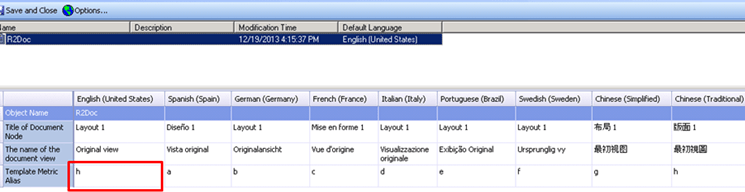
Before migration with blank translation for the default language:

After migration a different languages translation was populated for the default language:
ACTION:
Ensure that the default language always contains a translation when translations are added for other languages. This has been addressed in the 9.4.1 HotFix 3 release. Please upgrade to this version or later to take advantage of this fix.
WORKAROUND:
If possible, instead of merging the source object's and destination object's translations during migration, de-select the merge translation preferences, and either Replace or Force Replace the object with the update package. This way, the object is replaced, and the issue is not experienced.
