EducationSoftwareStrategy.com
StrategyCommunity

Knowledge Base

Product

Community

Knowledge Base

TopicsBrowse ArticlesDeveloper Zone

Product

Download SoftwareProduct DocumentationSecurity Hub

Education

Tutorial VideosSolution GalleryEducation courses

Community

GuidelinesGrandmastersEvents
x_social-icon_white.svglinkedin_social-icon_white.svg
Strategy logoCommunity

© Strategy Inc. All Rights Reserved.

LegalTerms of UsePrivacy Policy
  1. Home
  2. Topics

KB46489: Images referenced using relative path are resolved to the swf folder instead of the home folder when changing selectors in a Flash document in MicroStrategy Web 10.x


Community Admin

• Strategy


SYMPTOM:
 
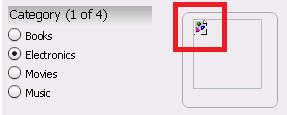
Strategy Web users could notice that images referenced using a relative path will show broken after changing selectors in a Flash document as shown below:


./images/1.jpg
ka04W000000OeLsQAK_0EM4400000026D1.png

 
In the picture above the selector was changed to electronics and the image showed when running the document initially, as shown below:

ka04W000000OeLsQAK_0EM4400000026Cu.png

 
If the user performs a Fiddler trace using KB20064 "How to install and use Fiddler for MicroStrategy Web troubleshooting" it will show that the image is referenced to the swf folder in the Web Server instead of the home folder defined initially as shown below:

ka04W000000OeLsQAK_0EM4400000026Cv.png

 
CAUSE:
This is a known issue with how relative images are resolved by the Adobe Flash player plug-in in Strategy Web.
Strategy will continue to investigate and post updates as soon as they are available.
 
WORKAROUND:
Images that are referenced using a double dot to denote a folder up will work correctly as shown below:


../images/1.jpg


Comment

0 comments

Details

Knowledge Article

Published:

June 12, 2017

Last Updated:

June 12, 2017