EducationSoftwareStrategy.com
StrategyCommunity

Knowledge Base

Product

Community

Knowledge Base

TopicsBrowse ArticlesDeveloper Zone

Product

Download SoftwareProduct DocumentationSecurity Hub

Education

Tutorial VideosSolution GalleryEducation courses

Community

GuidelinesGrandmastersEvents
x_social-icon_white.svglinkedin_social-icon_white.svg
Strategy logoCommunity

© Strategy Inc. All Rights Reserved.

LegalTerms of UsePrivacy Policy
  1. Home
  2. Topics

KB46498: "This is an incomplete project, there is no warehouse Database Instance defined. Please complete the definition of this project in order to use this functionality." error message appears when selecting Connection mapping in Project Configuration.


Stefan Zepeda

Salesforce Solutions Architect • Strategy


"This is an incomplete project, there is no warehouse Database Instance defined. Please complete the definition of this project in order to use this functionality." error message appears when selecting Connection mapping in Project Configuration.

SYMPTOM:
The following error message appears when selecting Connection mapping in Project Configuration in Strategy 9.x:

ka02R000000kYEZQA2_0EM440000002CQ7.jpeg


This is an incomplete project, there is no warehouse Database Instance defined. Please complete the definition of this project in order to use this functionality.
This can occur even if warehouse Database Instances are defined and reports can be run off of them in the project.
 
CAUSE:
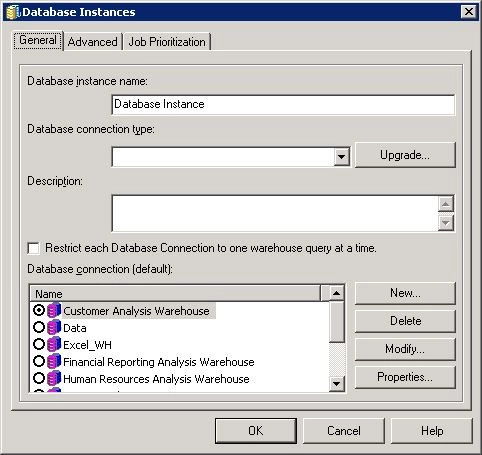
One cause for this issue is that an available database instance for the project is not fully defined as shown below.  This can happen after upgrading projects or duplicating projects into new project sources.

ka02R000000kYEZQA2_0EM440000002CQ9.jpeg

 
ACTION:
In order to access the Connection mapping settings, either specify an database connection type for the database instance or uncheck the database instance as available for the project.


Comment

0 comments

Details

Knowledge Article

Published:

June 9, 2017

Last Updated:

June 9, 2017