SYMPTOM:
Strategy Analytics Desktop users will notice that an error will show up when requesting the table names for a Netezza DataBase 6.x with more than 400 tables as shown below:
Sample Code/Error
Request Timeout
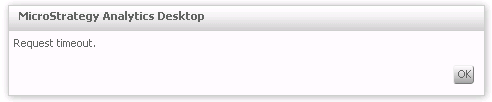
Additionally the tables area will show:
Sample Code/Error
Loading Failed!

Notice that this issue occurs even after increasing the request timeout in the sys_defaults.xml file to a large value like 500 seconds.
Netezza ODBC driver version 6.0 was used to reproduce this behavior.
CAUSE:
This is a known issue with retrieving the table names for a Netezza DataBase 6.x in Strategy Analytics Desktop.
ACTION:
Contact Strategy Technical Support for an update on this known issue.
WORKAROUND:
If the DataBase has less than 400 tables, increasing the request timeout in the sys_defaults.xml file is enough to retrieve the tables. However, the time to retrieve the table names has been observed to not increase linearly with the number of tables.
