EducationSoftwareStrategy.com
StrategyCommunity

Knowledge Base

Product

Community

Knowledge Base

TopicsBrowse ArticlesDeveloper Zone

Product

Download SoftwareProduct DocumentationSecurity Hub

Education

Tutorial VideosSolution GalleryEducation courses

Community

GuidelinesGrandmastersEvents
x_social-icon_white.svglinkedin_social-icon_white.svg
Strategy logoCommunity

© Strategy Inc. All Rights Reserved.

LegalTerms of UsePrivacy Policy
  1. Home
  2. Topics

KB46509: "The data types of the following columns have changed. These changes can potentially affect report execution and may need to be saved..." warning message occurs when updating the table structure in Warehouse Catalog 9.x.


Community Admin

• Strategy


SYMPTOM:
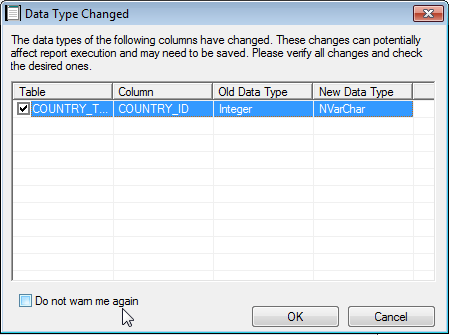
When trying to update the table structure of a table in Warehouse Catalog the following warning is returned:
         

ka04W000001MKwKQAW_0EM440000002CQF.png


The data types of the following columns have changed. These changes can potentially affect report execution and may need to be saved. Please verify all changes and check the desired ones.

CAUSE:
This error is typically caused by two scenarios: 

  1. The data type of the column was changed in the database. Strategy does not actually realize the change in data type until the table structure is updated.
  2. There are multiple columns with the same name and different data types. For example, suppose the column STORE_ID exists on two tables. On the first table, the data type is int, but the second table has a data type as VarChar. If the Strategy column is set to integer, then updating the structure of the second table will display this warning message. 

ACTION:
 Check the data types of all of the columns of the database that contain the same column name to ensure that they are the same data type if that is desired. Using different data types in the same column can result in problems when executing reports. Not only that, having columns with different data types and the same name can result in duplicate columns.
In the warning message window there are two options:

  1. If there was a change at the database level that should be reflected in Strategy, make sure that the columns that have been changed are selected and click OK.
  2. If no change has been made at the database level, uncheck the column (or cancel out of the window). Then, check the data types in the database for all columns with this column name to ensure that they contain the same data type.

If this warning message is shown, but all data types are the same in the database, contact Strategy Technical Support for further assistance.


Comment

0 comments

Details

Knowledge Article

Published:

April 3, 2017

Last Updated:

April 3, 2017