SUMMARY:
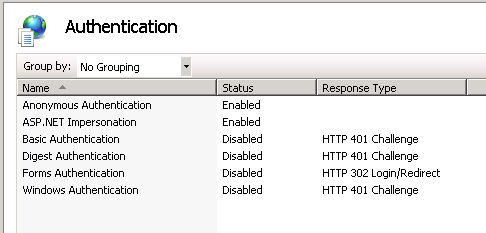
This technical note shows how to solve one particular cause of the error "Access is denied 401.3". The cause described in this technical note is due to the Windows user not having enough privileges to access the taskviewer.aspx file. The impact is limited to Strategy Web 9.x product only on Windows operating system, IIS 7 web server, and Anonymous authentication. The correct solution is described in this document.
SYMPTOM:
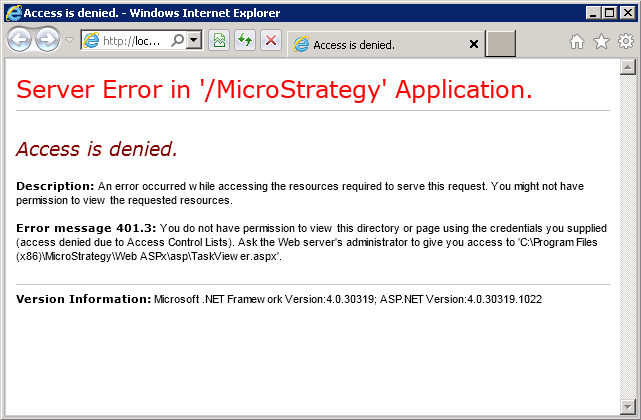
When trying to access the taskviewer.aspx page of Strategy Web, the end user receives the error below. This happens in IIS 7 web server configured to use Anonymous authentication using Internet Explorer.
Sample Code/Error
Description: An error occurred while accessing the resources required to serve this request. You might not have permission to view the requested resources.
Error message 401.3: You do not have permission to view this directory or page using the credentials you supplied (access denied due to Access Control Lists). Ask the Web server's administrator to give you access to 'C:\Program Files (x86)\MicroStrategy\Web ASPx\asp\TaskViewer.aspx'.
Version Information: Microsoft .NET Framework Version:4.0.30319; ASP.NET Version:4.0.30319.1022
STEPS TO REPRODUCE:
Follow these instructions to reproduce the issue.
CAUSE:
This behavior is expected when setting the authentication mode to Anonymous. By default, the TaskViewer.aspx page is prevented from being accessed by Anonymous access.
ACTION:
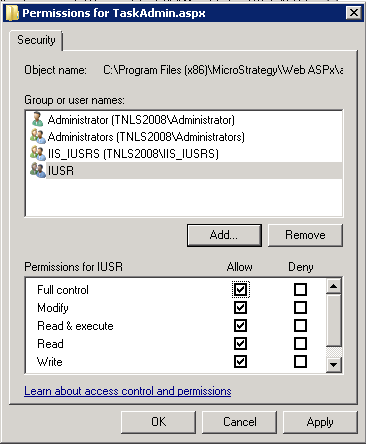
To use Anonymous authentication on those pages, add the "IUSR" group with full permission to the TaskViewer.aspx like shown below.
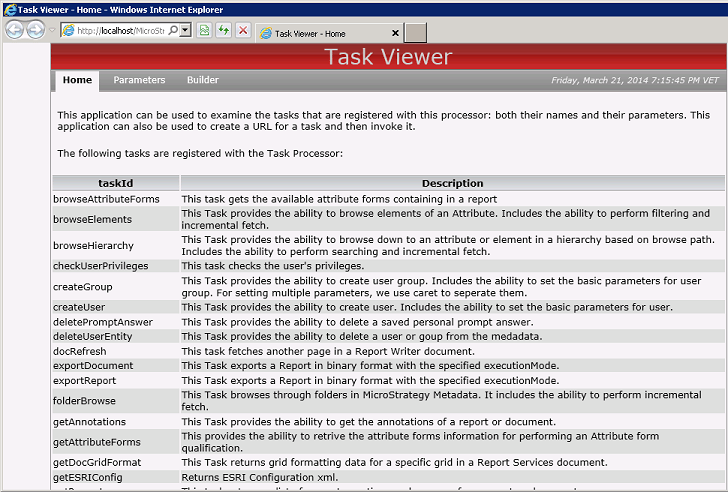
Afterward, the taskviewer.aspx page can be accessed successfully.
ADDITIONAL TROUBLESHOOTING:
If the steps above do not resolve the issue, please consider calling Strategy tech support with the following information of troubleshooting already done:
TO LEARN MORE:
Microsoft Windows user permissions resource:
http://www.iis.net/learn/get-started/planning-for-security/understanding-built-in-user-and-group-accounts-in-iis
Review the technotes below in the 'Related Links' section for more related information on this topic.
Third Party Software Installation WARNING:
The third-party product(s) discussed in this technical note is manufactured by vendors independent of Strategy. Strategy makes no warranty, express, implied or otherwise, regarding this product, including its performance or reliability.
