EducationSoftwareStrategy.com
StrategyCommunity

Knowledge Base

Product

Community

Knowledge Base

TopicsBrowse ArticlesDeveloper Zone

Product

Download SoftwareProduct DocumentationSecurity Hub

Education

Tutorial VideosSolution GalleryEducation courses

Community

GuidelinesGrandmastersEvents
x_social-icon_white.svglinkedin_social-icon_white.svg
Strategy logoCommunity

© Strategy Inc. All Rights Reserved.

LegalTerms of UsePrivacy Policy
  1. Home
  2. Topics

KB46540: Header and Footer settings in Desktop do not get applied to a PDF subscription if reports and documents were created in the project before the setting changes were made in MicroStrategy 9.3.x.


Community Admin

• Strategy


There are two ways to change the header and footer settings for a PDF export: "My Preferences" at the project-level in Desktop. Through project configuration. When PDF header and footer settings are changed in Desktop (through "My Preferences"), the setting is only applied to reports and documents created after the change was made. PDFs for reports and documents created prior to the setting change will be produced without the corresponding change in "My Preferences" for the project.

SYMPTOM:
 
There are two ways to change the header and footer settings for a PDF export:

  1. "My Preferences" at the project-level in Desktop.
  2. Through project configuration.

When PDF header and footer settings are changed in Desktop (through "My Preferences"), the setting is only applied to reports and documents created after the change was made. PDFs for reports and documents created prior to the setting change will be produced without the corresponding change in "My Preferences" for the project.
 
STEPS TO REPRODUCE:
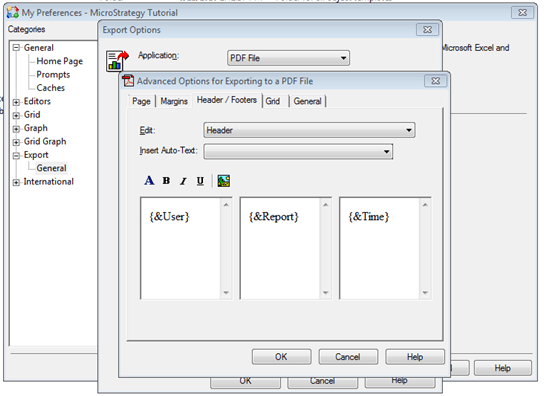
  • Right-click on a project in Strategy Desktop and select "My Preferences".
  • Go to Export > General > Advance.
  • Apply the desired setting changes to the "Advanced Options for Exporting to a PDF file" setting.
     
ka04W000000Oen5QAC_0EM4400000029Rn.png
  • Click OK. 
  • Create a send now subscription for an existing document to deliver as PDF.
  • The existing document will not reflect the changes made in step 3.

CAUSE:
 
This is a known issue in Strategy 9.3.x.
 
ACTION:
 
Contact Strategy Technical Support for an update on this issue.
 
WORKAROUND:
 
If the same settings are applied through "Project Configuration" instead of "My Preferences", the issue is not reproduced. Users should apply the desired PDF export settings in Project Configuration (instructions below). 
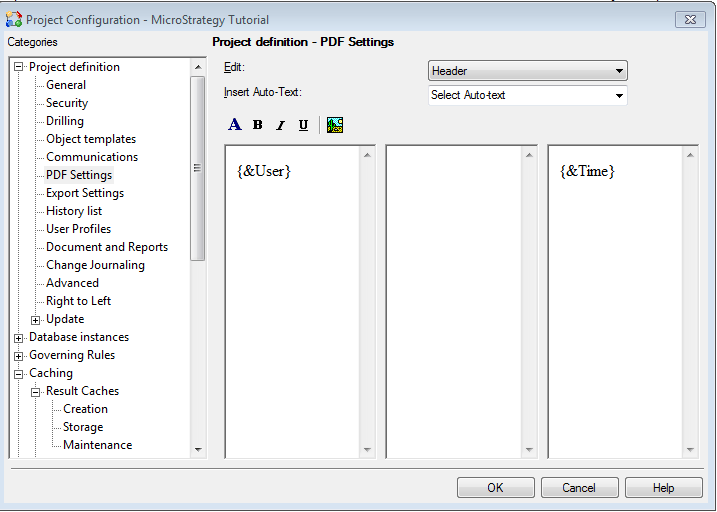
  • Right-click on a project in Strategy Desktop and select "Project Configuration".
  • Navigate to Project definition > PDF Settings.
  • Make the desired changes and click OK.
     
ka04W000000Oen5QAC_0EM4400000029Rw.png

Comment

0 comments

Details

Knowledge Article

Published:

June 5, 2017

Last Updated:

June 5, 2017