EducationSoftwareStrategy.com
StrategyCommunity

Knowledge Base

Product

Community

Knowledge Base

TopicsBrowse ArticlesDeveloper Zone

Product

Download SoftwareProduct DocumentationSecurity Hub

Education

Tutorial VideosSolution GalleryEducation courses

Community

GuidelinesGrandmastersEvents
x_social-icon_white.svglinkedin_social-icon_white.svg
Strategy logoCommunity

© Strategy Inc. All Rights Reserved.

LegalTerms of UsePrivacy Policy
  1. Home
  2. Topics

KB46545: How to stop a Report Services Document subscription from sending if no data is returned in MicroStrategy Web 9.x


Community Admin

Placeholder •


The following MicroStrategy KnowledgeBase Technical Note explains that the error handling settings in Project Configuration (in Desktop) do not apply to Report Services Documents in MicroStrategy 9.x

The following Strategy KnowledgeBase Technical Note explains that the error handling settings in Project Configuration (in Strategy Developer) do not apply to Report Services Documents in Strategy 9.x.
KB33130: MicroStrategy Distribution Services 9.x - 10.x "Delivery - Error handling" does not apply to Report Services Documents 
 
Alert Based Subscriptions can be used as a workaround for Report Services Documents. Refer to the following technical note for instructions on creating an alert-based subscription.
KB34054: How to create an alert-based subscription in MicroStrategy 9.x Distribution Services
 
The following instructions are for stopping a Report Services Document subscription from sending if no data is returned in Strategy Web 9.x.
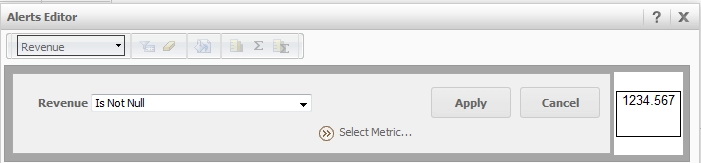
  • In Strategy Web 9.x, edit or execute a report.
  • Right-click on the metric header to apply the condition or threshold and select "Alerts".
  • Specify the condition "Is Not Null" to the metric for the delivery to be triggered in the filter editor as shown below.
     
ka04W000000OhIbQAK_0EM4400000026Ej.png
  • Expand the "Delivery Settings" section.
  • Specify the desired delivery options including recipient address, subscription name, delivery format, compression options and the schedule to run the report and check the condition. 

The subscription will be sent on the defined schedule only when data is returned in the Report Services Document.


Comment

0 comments

Details

Knowledge Article

Published:

May 26, 2017

Last Updated:

May 26, 2017