EducationSoftwareStrategy.com
StrategyCommunity

Knowledge Base

Product

Community

Knowledge Base

TopicsBrowse ArticlesDeveloper Zone

Product

Download SoftwareProduct DocumentationSecurity Hub

Education

Tutorial VideosSolution GalleryEducation courses

Community

GuidelinesGrandmastersEvents
x_social-icon_white.svglinkedin_social-icon_white.svg
Strategy logoCommunity

© Strategy Inc. All Rights Reserved.

LegalTerms of UsePrivacy Policy
  1. Home
  2. Topics

KB46562: In MicroStrategy Web 9.3.1, the check box selector does not wrap onto a second line when displaying a large number of attributes elements


Community Admin

• Strategy


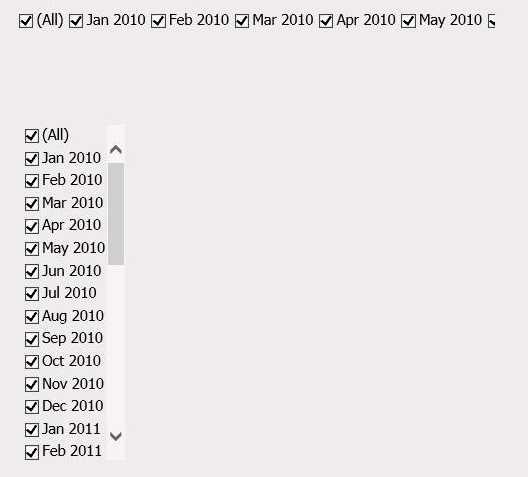
When the users try to display a large number of attribute elements with a check box selector, the list displays on one line and is cropped. The text does not wrap onto a second line.

SYMPTOM:
 
When the users try to display a large number of attribute elements with a check box selector, the list displays on one line and is cropped. The text does not wrap onto a second line.
 
STEPS TO REPRODUCE:
-Create a report with an attribute which has a lot of elements
-Add this report to a document as a dataset
-Create a check box selector with the attribute in such way that all the elements cannot be displayed on the current panel width
-Some of the elements are not displayed. They are not displayed on two different lines
 
WORKAROUND :
 
The users will be able to display all the attribute elements if they display the Check box selector vertically.
 

ka04W000000OhV1QAK_0EM4400000026Da.jpeg

Comment

0 comments

Details

Knowledge Article

Published:

May 17, 2017

Last Updated:

May 17, 2017