EducationSoftwareStrategy.com
StrategyCommunity

Knowledge Base

Product

Community

Knowledge Base

TopicsBrowse ArticlesDeveloper Zone

Product

Download SoftwareProduct DocumentationSecurity Hub

Education

Tutorial VideosSolution GalleryEducation courses

Community

GuidelinesGrandmastersEvents
x_social-icon_white.svglinkedin_social-icon_white.svg
Strategy logoCommunity

© Strategy Inc. All Rights Reserved.

LegalTerms of UsePrivacy Policy
  1. Home
  2. Topics

KB46625: There are no projects connected to the web server. To configure projects, go to Web Administrator, error message is seen by a user while trying to log on to MicroStrategy Web through SSO.


Community Admin

• Strategy


A user gets the following message on trying to log on to MicroStrategy Web through Single Sign On (SSO) even though the project access has been set up correctly, and the Intelligence Server has been added correctly on the Web Administrator: "There are no projects connected to the web server. To configure projects, go to Web Administrator"

SYMPTOM:
A user gets the following message on trying to log on to Strategy Web through Single Sign On (SSO) even though the project access has been set up correctly, and the Intelligence Server has been added correctly on the Web Administrator:
"There are no projects connected to the web server. To configure projects, go to Web Administrator"
 
On enabling the Authentication Server trace, the following entry is seen for the user:
Login using Simple Security Plug In with User ID='userid'
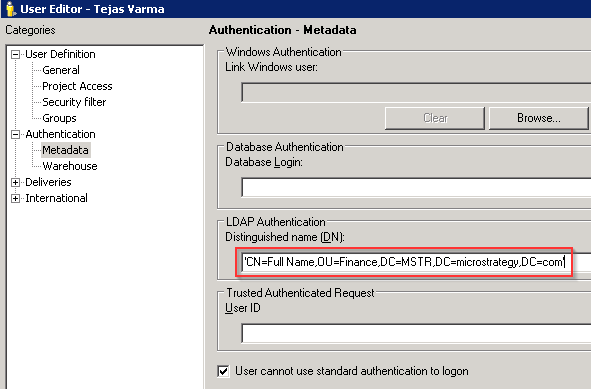
LDAP authentication trace: Failure in get LDAP user based on dn 'CN=Full Name,OU=Finance,DC=MSTR,DC=Strategy,DC=com'. (LDAP error 32: No such object)
CAUSE:
The Distinguished Name (DN) for the user is incorrect.
 
ACTION:
The correct DN should be obtained from the LDAP administrator and applied in the 'Authentication' section in the user editor:
 

ka04W000000Oh2YQAS_0EM4400000026DC.png


Comment

0 comments

Details

Knowledge Article

Published:

June 6, 2017

Last Updated:

June 6, 2017