EducationSoftwareStrategy.com
StrategyCommunity

Knowledge Base

Product

Community

Knowledge Base

TopicsBrowse ArticlesDeveloper Zone

Product

Download SoftwareProduct DocumentationSecurity Hub

Education

Tutorial VideosSolution GalleryEducation courses

Community

GuidelinesGrandmastersEvents
x_social-icon_white.svglinkedin_social-icon_white.svg
Strategy logoCommunity

© Strategy Inc. All Rights Reserved.

LegalTerms of UsePrivacy Policy
  1. Home
  2. Topics

KB46644: New feature in MicroStrategy Mobile 9.4.1 iOS Update 2: Sorting on column headers in a microchart widget.


Community Admin

• Strategy


Beginning in MicroStrategy Mobile iOS Update 2, users can sort on column headers in Microchart Widgets.

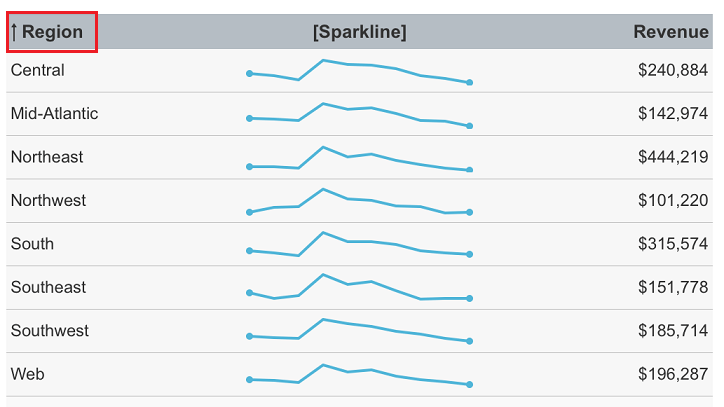
Sorting on columns headers is now available for Microchart Widgets when using Strategy Mobile 9.4.1 iOS update 2 on a mobile device. Users can tap on any header to sort by that column:
ka04W000001MKslQAG_0EM440000002A6i.png

 
It is required that the Intelligence Server version is 9.4.0 or higher.
 
The following is the expected behavior when sorting by a column:

  • If a column is sorted in ascending (descending) order, an up (down) arrow will be shown next to the header text.
  • Some space will be created for the arrow by reducing the space available for the header text. This may result in the header text getting truncated.
  • The position of the arrow is decided by the header text's alignment. If the header text is left/center aligned, the arrow will display at the left of the text, whereas if it is right, it will display at the right of the text.

Comment

0 comments

Details

Knowledge Article

Published:

April 4, 2017

Last Updated:

April 4, 2017