EducationSoftwareStrategy.com
StrategyCommunity

Knowledge Base

Product

Community

Knowledge Base

TopicsBrowse ArticlesDeveloper Zone

Product

Download SoftwareProduct DocumentationSecurity Hub

Education

Tutorial VideosSolution GalleryEducation courses

Community

GuidelinesGrandmastersEvents
x_social-icon_white.svglinkedin_social-icon_white.svg
Strategy logoCommunity

© Strategy Inc. All Rights Reserved.

LegalTerms of UsePrivacy Policy
  1. Home
  2. Topics

KB46651: The format type for Gauge widget values are not kept in Flash Mode in MicroStrategy Web 9.4.1


Community Admin

• Strategy


This issue has been classified as a defect by MicroStrategy. The impact is limited to when upgrading to the MicroStrategy Web 9.4.1 product while running a gauge widget in Flash Mode. A solution/code fix for this issue is available for MicroStrategy 9.4.1 Hotfix 3. There are some troubleshooting steps and additional information in the rest of this technote.

SYMPTOM:
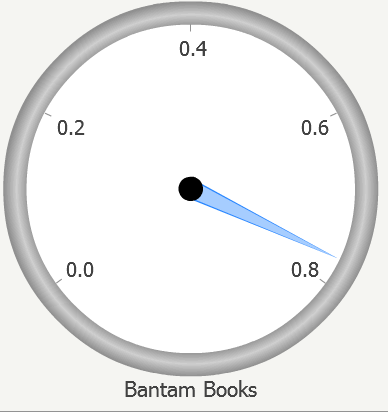
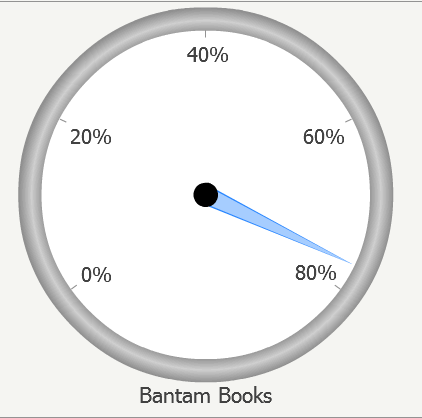
The format type for the Gauge widget values show up incorrectly in Flash Mode after upgrading to Strategy Web 9.4.1 from a previous version. Even though the values are set to percentages, the values show up as decimals in Flash Mode. It displays correctly in Interactive and Editable Mode. This defect is a regression issue that was not found in previous versions of Strategy prior to 9.4.1.
 
STEPS TO REPRODUCE:
  • In a version previous to Strategy Web 9.4.1, create a dashboard with a grid that contains an attribute and a percentage metric.
  • Go to Propeties and Formatting, and set the grid to Gauge Widget for Flash.
  • Go to View Mode and set it to Graph View.
  • Run the dashboard in Editable Mode.
  • Right-click on the graph and go to Format Graph.
  • Change the Graph Type to Gauge.
  • Change the Number Format for Y Axis Values to Percentage.
  • Run the dashboard in Flash Mode and the gauge widget will be shown in percentages, as shown below:
ka04W000000OfjGQAS_0EM4400000026D7.png
  • Note: Make sure that the Inherit graph formatting option is checked when you right-click on the gauge widget in Flash Mode.
  • Upgrade your environment to Strategy Web 9.4.1, and the gauge widget will be shown in decimals instead of percentages in Flash Mode, as shown below:
ka04W000000OfjGQAS_0EM4400000026D9.png

 
CAUSE:
This is a known defect. This is also a regression issue after upgrading an environment to Strategy 9.4.1. The cause of the issue was that in Strategy 9.4.1, there were server-side changes for graph automatic formatting for which the Flash client widgets were not aware of.
 
ACTION:
A fix is available in Strategy 9.4.1 Hotfix 3. Apply this hotfix to address the issue.
 
ADDITIONAL TROUBLESHOOTING STEPS:

  1. In Editable Mode, change the number format for the Y-Axis values from Percentage to From Grid.
  2. Toggle the Inherit Graph Formatting option when right-click on Flash Mode.
  3. Re-create the grid from scratch and the issue should not occur.


Comment

0 comments

Details

Knowledge Article

Published:

April 17, 2017

Last Updated:

April 6, 2018