EducationSoftwareStrategy.com
StrategyCommunity

Knowledge Base

Product

Community

Knowledge Base

TopicsBrowse ArticlesDeveloper Zone

Product

Download SoftwareProduct DocumentationSecurity Hub

Education

Tutorial VideosSolution GalleryEducation courses

Community

GuidelinesGrandmastersEvents
x_social-icon_white.svglinkedin_social-icon_white.svg
Strategy logoCommunity

© Strategy Inc. All Rights Reserved.

LegalTerms of UsePrivacy Policy
  1. Home
  2. Topics

KB46652: Toggling selections in the parent selector does not populate the child selector correctly in MicroStrategy Web 9.4.1


Community Admin

• Strategy


Toggling selections in the parent selector does not populate the child selector correctly in MicroStrategy Web 9.4.1

SUMMARY:
This issue has been classified as a defect by Strategy. The impact is limited to when upgrading to the Strategy Web 9.4.1 product while running a document with cascading selections. A solution/code fix for this issue is available for Strategy 9.4.1 Hotfix 3. There are some troubleshooting steps and additional information in the rest of this technote.
SYMPTOM:
A parent selector does not correctly populate the child selector after upgrading the dashboard to Strategy Web 9.4.1.
 
STEPS TO REPRODUCE:
  • In a Strategy version previous to 9.4.1, create a dashboard with a parent selector and a child selector. Have the parent selector target the child selector.
  • Associate attibutes in the same hierarchy to the selectors.
  • Also create a panel stack that contains a grid that correspond to the selector attributes.
  • Have the child selector target the panel stack.
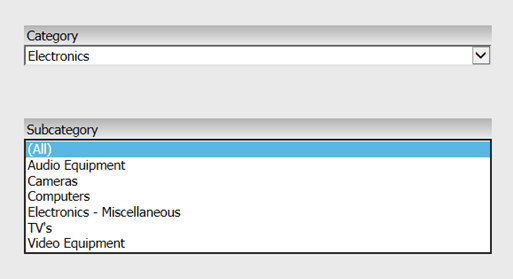
  • Run the dashboard in any of the view modes and the selectors should work properly, as shown below:
ka04W000000OgjgQAC_0EM4400000026D2.png
  • Note: Selecting "Electronics" in the Category selector correctly populates the child Subcategory selector
  • Upgrade the dashboard to Strategy Web 9.4.1.
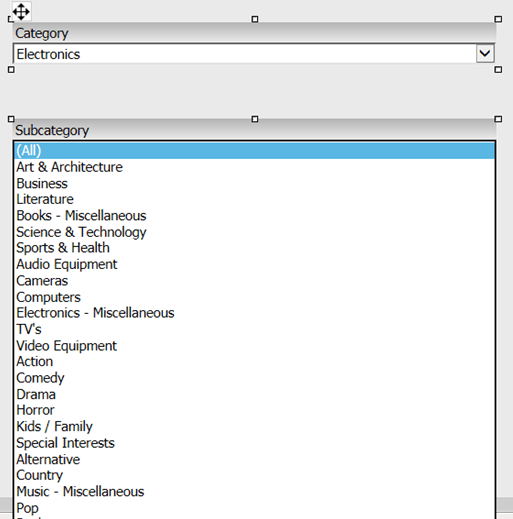
  • Now run the dashboard in any view mode, and the selectors will show a different behavior, as shown below:
ka04W000000OgjgQAC_0EM4400000026D5.png
  • Notice: Even though there is a selection in the Category attribute, the Subcategory does not get properly filtered according to the selection.

 
CAUSE:
This is a known regression issue with Strategy Web 9.4.1. Code changes made in MicroStrateby 9.4 made to fix other issues changed the behavior of the selectors.
 
ACTION:
The fix for this issue is available in Strategy 9.4.1 Hotfix 3. Please upgrade to this version to take advantage of the fix.
 
ADDITIONAL TROUBLESHOOTING:

  1. Toggle the Selector Type from Slice to Filter in the Selector properties.
  2. Re-create the selectors from scratch.
  3. Have the parent selector target the panel stack as well as the child selector.

ADDITIONAL INFORMATION:

  1. Regarding selector issues in Strategy 9.4.1, please check out: KB46425, KB46376, and KB46284.
  2. Double-check to see if the relationship of the selectors makes any difference in the behavior. For more information on schema relationship and dataset relationship, please check out the product manuals.


Comment

0 comments

Details

Knowledge Article

Published:

June 12, 2017

Last Updated:

June 12, 2017