SYMPTOM:
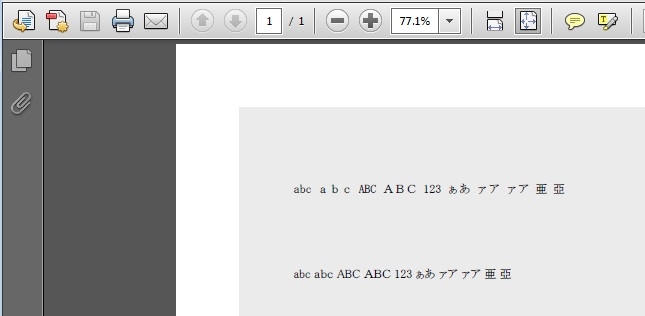
When exporting a document containing text objects, Japanese characters in the text objects are not exported to PDF if the font "MS P Mincho" is used.
STEPS TO REPRODCE:
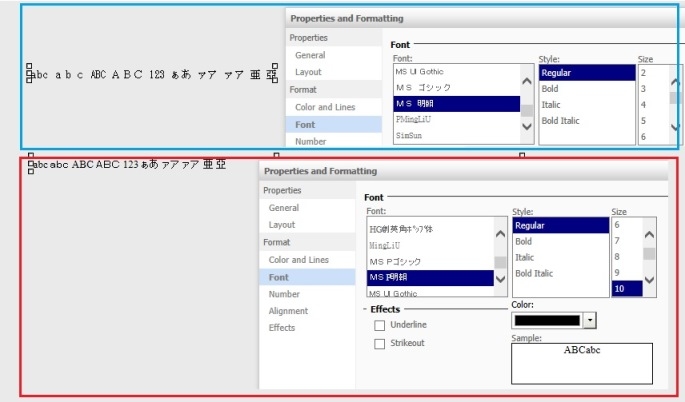
1. Create a document and insert two text objects (named T1 and T2)
2. In each of the text box objects, enter the text entry as follows
abc abc ABC ABC 123 ぁあ ァア ァア 亜 亞
3. Set the font as follows
T1: MS Mincho (MS 明朝)
T2: MS P Mincho (MS P 明朝)
4. Save the document and run it. The texts are displayed correctly in Web.
5. When exporting the document to PDF, however, the Japanese characters in T2 (MS P Mincho) are not exported as shown below:

CAUSE:
This is a known issue in Strategy Web 9.4.1
ACTION:
Strategy will continue to investigate and post updates as soon as they are available.
WORKAROUND:
Re-specify the font in Strategy Developer in the following steps.
1. Open the document in the edit mode in Strategy Developer.
2. Change the font to anything else first, and then re-specify the font to "MS P Mincho (MS P 明朝)"
3. Save the document.
4. Open the document in Strategy Web, and now all the characters are exported to PDF