EducationSoftwareStrategy.com
StrategyCommunity

Knowledge Base

Product

Community

Knowledge Base

TopicsBrowse ArticlesDeveloper Zone

Product

Download SoftwareProduct DocumentationSecurity Hub

Education

Tutorial VideosSolution GalleryEducation courses

Community

GuidelinesGrandmastersEvents
x_social-icon_white.svglinkedin_social-icon_white.svg
Strategy logoCommunity

© Strategy Inc. All Rights Reserved.

LegalTerms of UsePrivacy Policy
  1. Home
  2. Topics

KB46694: "--" is displayed instead of Data on a Report including Derived Elements even though the evaluation order and Smart Metric are correctly set. Inconsistent behavior of list vs. calculation.


Community Admin

• Strategy


Article outlines a known issue where a report with derived elements returns "--" incorrectly in MicroStrategy Web 9.3.1. A workaround is provided.

A report with derived elements returns no data in Strategy Web 9.3.1, instead the cells are populated with "--".
STEPS TO REPRODUCE
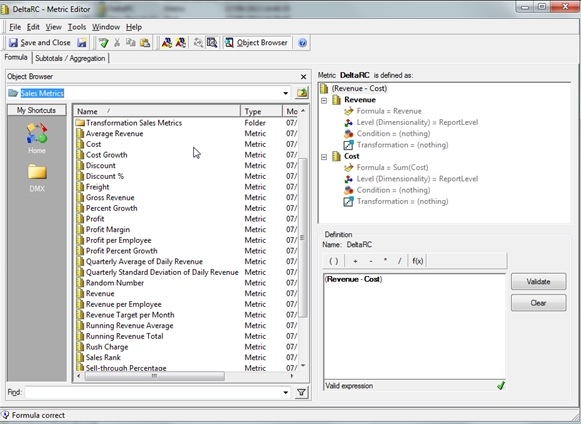
1) Create a Metric "DeltaRC" defined as (Revenue – Cost). Please use the Revenue and Cost Metrics (not facts) 
ka04W000000OcBzQAK_0EM440000002HIa.jpeg

 2) Enable smart Metric 

ka04W000000OcBzQAK_0EM440000002HIX.jpeg

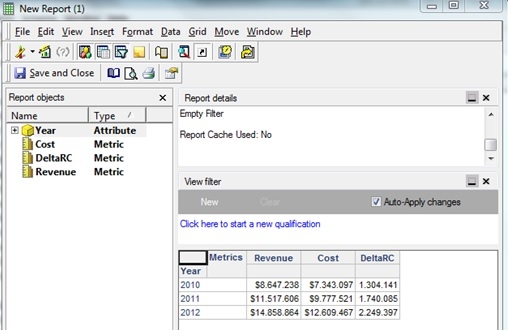
3) From Desktop, create the following Report: 
 

ka04W000000OcBzQAK_0EM440000002HIP.jpeg

 
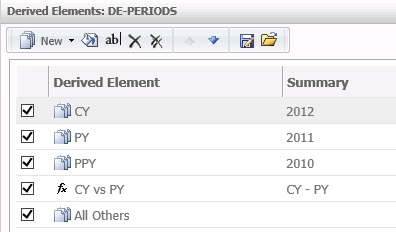
4) Now go to Web, Run the report and create the following Derived Elements
 
     CY    = 2012                            (list)
     PY    = 2011                            (list)
     PPY = 2010                            (list)
     CY vs PY = CY - PY                (calculation: in the formula, use the Derived elements created before) 


ka04W000000OcBzQAK_0EM440000002HIS.jpeg


ka04W000000OcBzQAK_0EM440000002HIV.jpeg

 
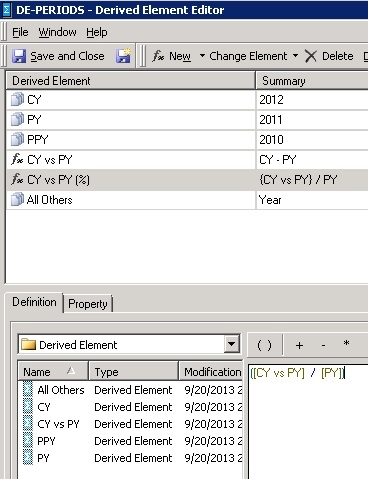
  5) Save the derived elements as a standalone object named DE-PERIODS


ka04W000000OcBzQAK_0EM440000002HIL.jpeg

 
6) The compound metric shows incorrect data in both Web and Desktop as shown below: 
 

ka04W000000OcBzQAK_0EM440000002HIJ.jpeg


ka04W000000OcBzQAK_0EM440000002HIN.jpeg

 
WORKAROUND
 
Select the Derived Element and delete it.
 
Add the Attribute Year and create a new Derived Element.
 
The Metric now displays its data correctly as shown below:


ka04W000000OcBzQAK_0EM440000002HIY.jpeg


ACTION
This issue is Fixed Confirmed in Strategy 9.4.1, upgrade to take advantage of the fix


Comment

0 comments

Details

Knowledge Article

Published:

May 19, 2017

Last Updated:

May 19, 2017