SYMPTOM:
In Strategy Web, default prompt answers continue to be displayed after saving a document with the 'Display prompt but discard current answers' option selected.
STEPS TO REPRODUCE:
1. Log in to Strategy Web as Administrator.
2. Create an Attribute Element List prompt (for example on Customer) and a Metric Qualification prompt (for example qualify on Profit). Save it with “Prompt answer is required” unchecked.
3. Create a simple report, Customer and Call Center in rows and Cost and Profit in columns, with both prompts.
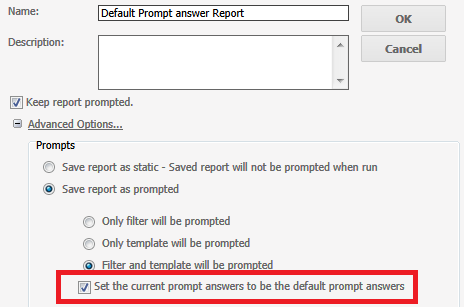
4. Save the above report as prompted with some default answers - choosing the first two customer elements.
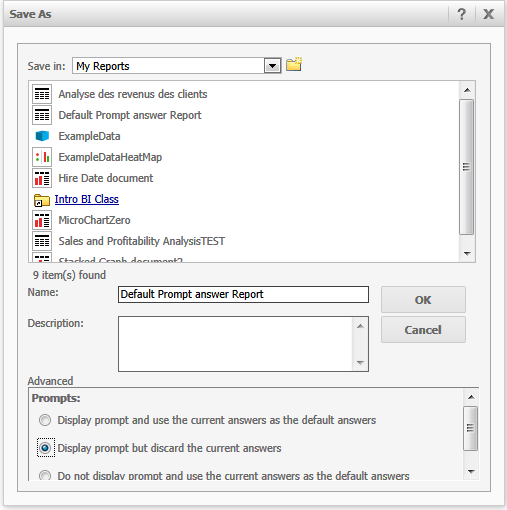
5. Create a document with above report, save it and select “Display prompt but discard the current answers” option.
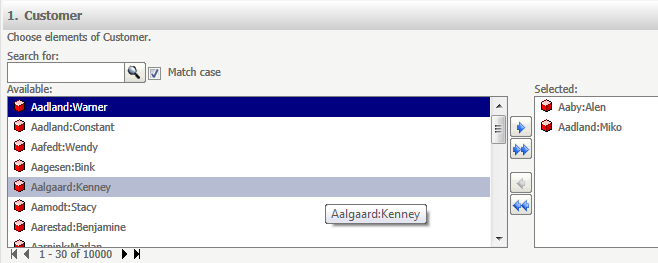
6. Run the above created document and you will still see the two first customer elements selected previously:
CAUSE:
This behavior is currently by design. The resolution server will go through the prompt as following sequence: document level, dataset level, prompt level. If there is no prompt answers in all levels, there will be no default answers displayed. In above example the default prompt answers of the underlying dataset of the document remain and are the one that are displayed. In order to discard default answers on document level, they also have to be discarded on dataset and prompt level.
46695
