EducationSoftwareStrategy.com
StrategyCommunity

Knowledge Base

Product

Community

Knowledge Base

TopicsBrowse ArticlesDeveloper Zone

Product

Download SoftwareProduct DocumentationSecurity Hub

Education

Tutorial VideosSolution GalleryEducation courses

Community

GuidelinesGrandmastersEvents
x_social-icon_white.svglinkedin_social-icon_white.svg
Strategy logoCommunity

© Strategy Inc. All Rights Reserved.

LegalTerms of UsePrivacy Policy
  1. Home
  2. Topics

KB46716: How to integrate Essbase data security into MicroStrategy MDX reporting with connection mapping in MicroStrategy 9.x-10.x?


Community Admin

• Strategy


In some business scenarios, it is required to integrate Essbase data security into Strategy MDX reporting with connection mapping in Strategy 9.x.
 
The following steps demonstrate how to to that in Strategy Tutorial project:
 

  1. Create two users which have different data access to one cube with sales data in Essbase server. One user has no data access to East and South while the other has no data access to West and Central.
  2. In Strategy Tutorial project, create one database instance "Essbase Data Source" connecting to Essbase data source. The database connection name is "Essbase Data Source Connection". Import Essbase cube into the project and create a MDX report for test.
  3. Create two Strategy users: Testuser1 and Testuser2 with same privileges in Strategy Desktop.
  4. Create two database logins with the two Essbase users in Strategy Desktop as shown below:
ka04W000000OagqQAC_0EM440000002CPg.png


ka04W000000OagqQAC_0EM440000002CPO.png


  • Configure connection mapping in Project Configuration as shown below:


The two test users can have different database logins for the same DB instance. Restart Intelligence Server.
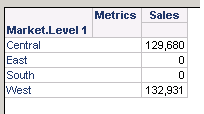


  • In Strategy Desktop, login project with Testuser1, the MDX report is as shown below:
ka04W000000OagqQAC_0EM440000002CPj.png

 
When login project with Testuser2, the MDX report is as shown below:
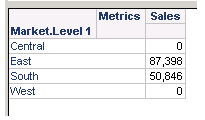
 

ka04W000000OagqQAC_0EM440000002CPh.png


KB46716


Comment

0 comments

Details

Knowledge Article

Published:

May 26, 2017

Last Updated:

December 31, 2018