In Strategy Web 9.4.x, users are able to create print subscriptions from the interface by clicking on the "Add print subscription" button from the subscriptions page:
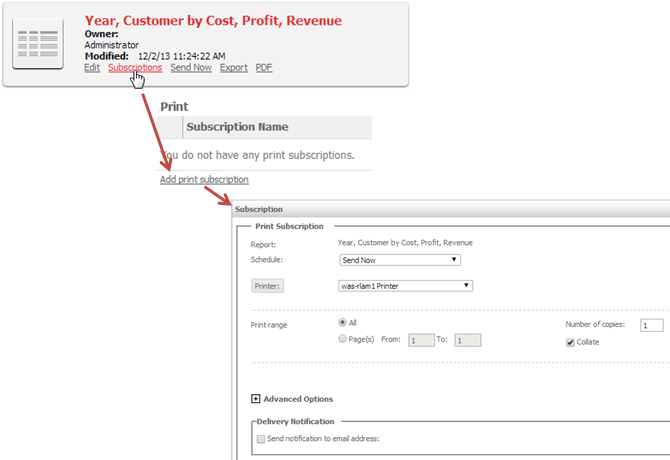
The following Web SDK Java sample creates a print subscription for a document and sends it to the printer immediately by setting Send Now as true:
import com.Strategy.web.objects.WebIServerSession;
import com.Strategy.web.objects.WebObjectsException;
import com.Strategy.web.objects.WebObjectsFactory;
import com.Strategy.webapi.EnumDSSXMLApplicationType;
import com.Strategy.web.beans.BeanFactory;
import com.Strategy.web.beans.RWBean;
import com.Strategy.web.beans.SubscriptionBean;
import com.Strategy.web.beans.WebBeanException;
import java.util.Enumeration;
import com.Strategy.web.objects.SimpleList;
import com.Strategy.web.objects.WebSubscription;
import com.Strategy.web.objects.WebSubscriptionAddress;
import com.Strategy.web.objects.WebSubscriptionContentFormat;
import com.Strategy.web.objects.WebSubscriptionDeliveryModePrintProperties;
import com.Strategy.web.objects.rw.EnumRWExecutionModes;
import com.Strategy.web.objects.rw.RWInstance;
import com.Strategy.webapi.EnumDSSXMLSubscriptionDeliveryType;

public class CreatePrintSubscriptionSimple {
	static WebObjectsFactory factory = WebObjectsFactory.getInstance();
	static WebIServerSession serverSession = factory.getIServerSession();

	public static void main(String[] args) throws WebBeanException, WebObjectsException {
		String SessionID = "";

		serverSession.setServerName("INTELLIGENCE_SERVER");
		serverSession.setServerPort(0);
		serverSession.setProjectName("PROJECT_NAME");
		serverSession.setLogin("USERNAME");
		serverSession.setPassword("PASSWORD");
		serverSession.setApplicationType(EnumDSSXMLApplicationType.DssXmlApplicationCustomApp);

		try {
			SessionID = serverSession.getSessionID();
        }
        catch (WebObjectsException ex) { }

		String docID = "DOCGUID_HERE";

		RWBean rwb = (RWBean) BeanFactory.getInstance().newBean("RWBean");
		rwb.setSessionInfo(serverSession);
		rwb.setObjectID(docID);
		rwb.setExecutionMode(EnumRWExecutionModes.RW_MODE_PDF);

		RWInstance rwi = rwb.getRWInstance();
		rwi.setAsync(false);
		rwi.pollStatus();

		int status = rwi.getStatus();

		SubscriptionBean sb = (SubscriptionBean) BeanFactory.getInstance().newBean("SubscriptionBean");
		sb.setSessionInfo(serverSession);
		sb.setContent(rwb);

		WebSubscription ws = sb.getSubscription();
		ws.populate();
		ws.setName("PRINTING.pdf");
		ws.setDeliveryMode(EnumDSSXMLSubscriptionDeliveryType.DssXmlDeliveryTypePrinter);
		ws.setSendNow(true);

		SimpleList formats = ws.getContent().getAvailableFormats();
		WebSubscriptionContentFormat format = null;

		for (int z = 0;z < formats.size();z++) {
			format = (WebSubscriptionContentFormat) formats.item(z);

			if (format.getName().equalsIgnoreCase("PDF")) {
				ws.getContentProperties().setFormat(format);
            }
        }

		WebSubscriptionDeliveryModePrintProperties wdp = (WebSubscriptionDeliveryModePrintProperties) ws.getDeliveryMode();
		wdp.setPortrait(true);
		wdp.setUsePrintRange(false);

		SimpleList addresses = sb.getAvailableAddresses();
		Enumeration < WebSubscriptionAddress > adds = addresses.elements();
		WebSubscriptionAddress addy = null;

		while (adds.hasMoreElements()) {
			WebSubscriptionAddress address = adds.nextElement();
			if (address.getName().equalsIgnoreCase("printer")) {
				addy = address;
            }
        }
		ws.setAddress(addy);
		sb.save();

	}
}
