EducationSoftwareStrategy.com
StrategyCommunity

Knowledge Base

Product

Community

Knowledge Base

TopicsBrowse ArticlesDeveloper Zone

Product

Download SoftwareProduct DocumentationSecurity Hub

Education

Tutorial VideosSolution GalleryEducation courses

Community

GuidelinesGrandmastersEvents
x_social-icon_white.svglinkedin_social-icon_white.svg
Strategy logoCommunity

© Strategy Inc. All Rights Reserved.

LegalTerms of UsePrivacy Policy
  1. Home
  2. Topics

KB46737: Unable to delete metric/attribute due to dependent reports/documents, although metric/attribute object is not seen in the report/document definition.


Stefan Zepeda

Salesforce Solutions Architect • Strategy


KB46737: Unable to delete metric/attribute due to dependent reports/documents, although metric/attribute object is not seen in the report/document definition.

SUMMARY
This issue has been observed as a possible cause for not being able to delete an object. The impact is limited to Strategy Web and Developer whenever a user attempts to delete an attribute/metric. The inability to delete the object is not due to a limitation, but rather a default behavior. The specific scenario and solution is described in the below sections.
 
SYMPTOM:
In Strategy 10.x, Attributes/Metrics cannot be deleted due to dependencies on Report Services Document, although the attribute is not seen either in the Document, or its composing dataset. Consider the following example:

  • In Strategy Tutorial, create a simple attribute off the LU_YEAR table and name it "DELETE ME".
  • Add the newly created attribute to the "Supplier Sell - Through Analysis" report (path: Strategy Tutorial\Public Objects\Reports\Subject Areas\Supplier Analysis).
  • Create a new document and use the Supplier Sell - Through Analysis report as a dataset. Add the report to the Detailed Header of the Document.
     
ka02R000000kc0pQAA_0EM440000002CPL.png
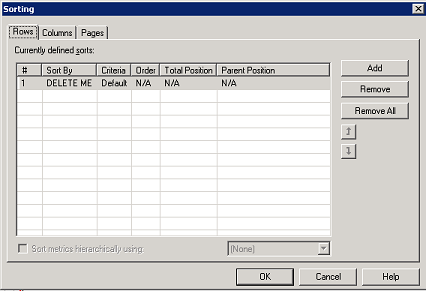
  • Under Data menu select 'Advanced Sorting' and Sort By 'DELETE ME' attribute.
     
ka02R000000kc0pQAA_0EM440000002CPM.png
  • Save the Document and return to the Dataset. Remove the DELETE ME attribute from report, Save and Close, and re-open the Document.
  • The DELETE ME attribute is no longer on the document grid, but still exists in the Advanced Sorting.
  • Try to delete the DELETE ME attribute, and see the following message:

    "Cannot Delete 'Attribute' befcause other objects depend on it. Do you want to search for dependent objects?".
ka02R000000kc0pQAA_0EM440000002CPY.png
  • When searching for dependent objects, the Test Document is shown.
     
ka02R000000kc0pQAA_0EM440000002CPN.png
  • Right-click the document and 'Search for Components'. See the 'DELETE ME' attribute appears; although, it no longer exists on the grid or report (left picture below).
  • Now right-click the 'Supplier Self-Through Analysis' report and search for its components. Observe that 'DELETE ME' is not part of it; although, the report is the only dataset constructing the Test Document (on the right).  
     
ka02R000000kc0pQAA_0EM440000002CPK.png
ka02R000000kc0pQAA_0EM440000002CPX.png
  • Often, users make modifications to underlying reports, adding/removing objects such as the 'DELETE ME' attribute. Although it seems the attribute no longer exists on neither the document, nor the report, the user is unable to delete it. This can be confusing, and may lead to assumptions for lingering object dependency and inconsistent metadata.  

CAUSE:
Users are unable to delete the 'DELETE ME' attribute because although removed from report, it still exists in the 'Advanced Sorting'.
 
ACTION: 
When unable to delete a metric/attribute because it has dependent reports/documents, always check the 'Advanced Sorting' of the report/document, as the object may still be present, although, it is not part of the report anymore.   
 
TO LEARN MORE:
In many instances, an object cannot be deleted due to lingering dependencies and a Metadata which is in an inconsistent state. It is recommended in such cases, to perform 'Managed Object' and Hidden Object' search because often the hidden dependencies will display only after this type of search. If this does not help, please contact Strategy Technical Support. For more specific information, please refer to:

  • KB40027 - Attribute cannot be deleted even though a dependency search shows only logical tables in Strategy Desktop 9.2.1.
  • TN36747 - "Cannot delete "attribute name" because other objects depend on it. Do you want to search the dependent objects?" message shows when trying to delete an attribute and the only dependent objects are logical tables and system hierarchies.
  • TN35475 -  "Cannot delete 'Table_Name' because other objects depend on it" message is received when attempting to delete a table alias even though no attributes appear to be mapped to it in Strategy Desktop 9.0.x.
  • TN32101 - "Cannot delete "XXX" because other objects depend on it. Do you want to search on the dependent object?" error occurs when trying to delete an attribute that has no apparent dependents in Strategy Desktop 9.x.
  • KB44279 - "Cannot delete '' because other objects depend on it. Do you want to search the dependent objects?" error message appears when deleting an attribute in Strategy Desktop 9.2.1m and 9.3.0 

This error message can be seen due to dependencies related to other Strategy object such as prompts, DB Instances, profile folders, etc. In addition to the listed above Technical Notes, there are numerous other TNs describing different scenarios where this issue occurs. Please search the Strategy Kbase for your specific scenario.  


Comment

0 comments

Details

Knowledge Article

Published:

June 1, 2017

Last Updated:

June 1, 2017