EducationSoftwareStrategy.com
StrategyCommunity

Knowledge Base

Product

Community

Knowledge Base

TopicsBrowse ArticlesDeveloper Zone

Product

Download SoftwareProduct DocumentationSecurity Hub

Education

Tutorial VideosSolution GalleryEducation courses

Community

GuidelinesGrandmastersEvents
x_social-icon_white.svglinkedin_social-icon_white.svg
Strategy logoCommunity

© Strategy Inc. All Rights Reserved.

LegalTerms of UsePrivacy Policy
  1. Home
  2. Topics

KB46745: How to drill from within a grid on a document and keep all report objects in the new report for MicroStrategy Web 9.4.1.


Community Admin

• Strategy


How to drill from within a grid on a document and keep all report objects in the new report for MicroStrategy Web 9.4.1.

SUMMARY:
This technical note describes the steps to drill from a grid on a document and keep all report objects even if they are not displayed on the grid. The impact is limited to Strategy Web 9.4.1.
 
 
PROCEDURE:
The following procedure describes how to keep all report objects when drilling from a grid within a document.
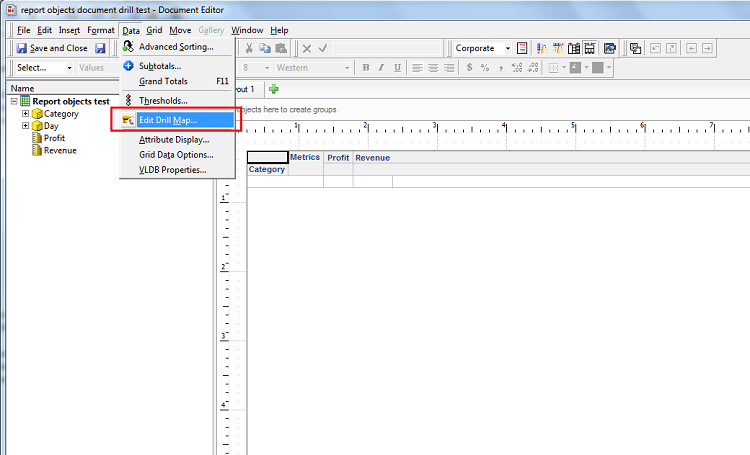
  • For the Report Services Document in question, edit the grid from which you want to perform drilling in Strategy Desktop and in the Data menu, select "Edit Drill Map" as seen below.
ka04W000000OgccQAC_0EM4400000026AY.png
  • In the drill map editor, define the drill path for the attribute you wish as seen below.
ka04W000000OgccQAC_0EM4400000026AU.png
  • For that path, at the right Properties panel, select the property called "Keep base template," and set the property to "True" as seen below.
ka04W000000OgccQAC_0EM4400000026AS.png
  • Save drill map and document. 
  • Now, if you run the document and drill from your selected attribute to a lower level you will see that all report objects are kept after drilling as seen below.
ka04W000000OgccQAC_0EM4400000026AQ.png

The restriction is that the property can only be defined for attribute path drilling, and not at the hierarchy level. 


Comment

0 comments

Details

Knowledge Article

Published:

June 13, 2017

Last Updated:

June 13, 2017