EducationSoftwareStrategy.com
StrategyCommunity

Knowledge Base

Product

Community

Knowledge Base

TopicsBrowse ArticlesDeveloper Zone

Product

Download SoftwareProduct DocumentationSecurity Hub

Education

Tutorial VideosSolution GalleryEducation courses

Community

GuidelinesGrandmastersEvents
x_social-icon_white.svglinkedin_social-icon_white.svg
Strategy logoCommunity

© Strategy Inc. All Rights Reserved.

LegalTerms of UsePrivacy Policy
  1. Home
  2. Topics

KB46749: Deleting a user from the Search for Configuration objects dialog box does not delete the dependent subscriptions for that user in MicroStrategy Analytics Enterprise 9.4.1.


Stefan Zepeda

Salesforce Solutions Architect • Strategy


This issue has been classified as a defect by MicroStrategy. This defect is present in all MicroStrategy Developer 9.x products. A workaround is available in this current document. A solution/code fix for this issue is not available in current releases but is being reviewed for a future MicroStrategy release.

SUMMARY:
This issue has been classified as a defect by Strategy. This defect is present in all Strategy Developer 9.x products. A workaround is available in this current document. A solution/code fix for this issue is not available in current releases but is being reviewed for a future Strategy release.
 
SYMPTOM:
When deleting a user from the the Search for Configuration objects dialog box the dependent subscriptions for that user are not deleted as well. 
 
STEPS TO REPRODUCE: 
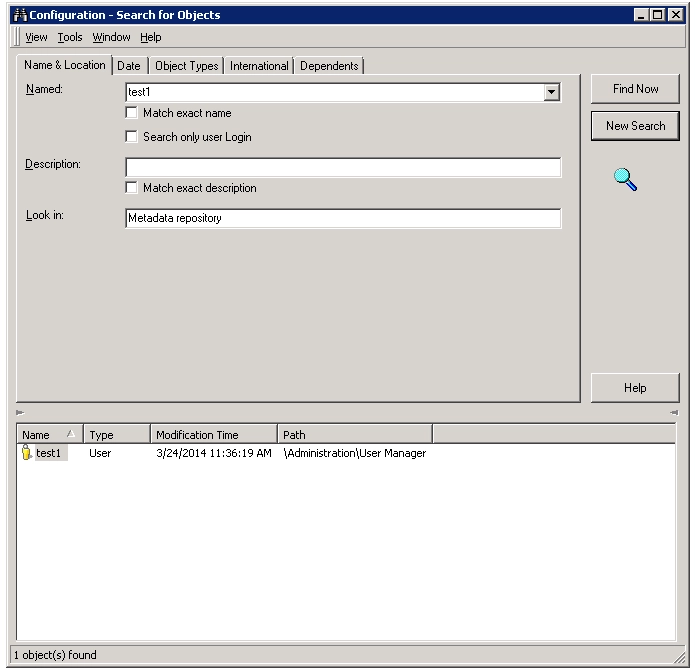
  • Search for a user that has subscriptions using the search for configuration option
ka02R000000kYQNQA2_0EM440000002COj.png
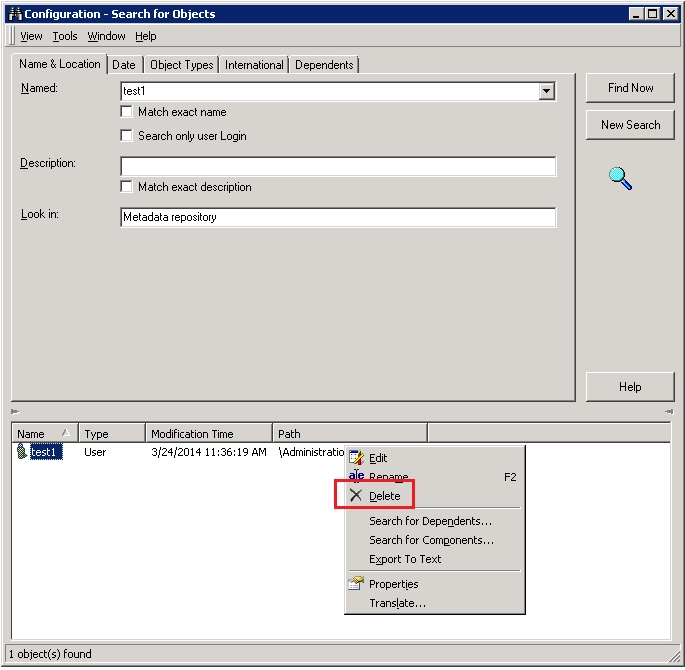
  • In the results section of the search for configuration objects dialog box right click user and select delete.
ka02R000000kYQNQA2_0EM440000002COc.png
  • Notice in the subscription monitor that subscriptions for that user are still available and not deleted.


ka02R000000kYQNQA2_0EM440000002COh.png


CAUSE:
This is a known issue classified as a defect with Strategy Developer 9.x.
 
ACTION:
Contact Strategy Technical Support for an update on the status of the issue. Currently this issue is still being reviewed for feasibility by our Technology team and it is not scoped for any upcoming scheduled Strategy release.
 
WORKAROUND:
To workaround this issue administrators can perform one of following workarounds.

  • Delete users directly from the user manager as opposed to the search for configuration objects dialog box as seen below.
ka02R000000kYQNQA2_0EM440000002COf.png
  • Manually delete the user's subscriptions from the subscription monitor in Developer as seen below.
ka02R000000kYQNQA2_0EM440000002COe.png

ADDITIONAL TROUBLESHOOTING:
If the workaround steps above do not resolve the issue, please consider calling Strategy tech support with the following information of troubleshooting already done:

  • Results or output of following the above workaround steps.
  • Results of investigating whether the user's profile folder still exists after user deletion
  • The exact Strategy Developer version where issue is occurring.
  • The results of attempting to manually delete the user subscriptions

TO LEARN MORE:
Related technotes:
 
KB37078: When deleting a user from the "Search Configuration Objects" the user profile folder is not deleted.
KB44540: How to Delete a User and User Profile using the Strategy Web SDK 9.2.x-9.3.x


Comment

0 comments

Details

Knowledge Article

Published:

June 8, 2017

Last Updated:

June 8, 2017