EducationSoftwareStrategy.com
StrategyCommunity

Knowledge Base

Product

Community

Knowledge Base

TopicsBrowse ArticlesDeveloper Zone

Product

Download SoftwareProduct DocumentationSecurity Hub

Education

Tutorial VideosSolution GalleryEducation courses

Community

GuidelinesGrandmastersEvents
x_social-icon_white.svglinkedin_social-icon_white.svg
Strategy logoCommunity

© Strategy Inc. All Rights Reserved.

LegalTerms of UsePrivacy Policy
  1. Home
  2. Topics

KB46758: "This prompt object cannot be added to the report as a template unit" error message appears when the Object Prompt is based on search for Metrics in a specific folder in MicroStrategy Web 9.4.1


Community Admin

• Strategy


When adding an Object Prompt referencing a new search created for metrics in a specific folder to a report from Web, an error occurs.

SYMPTOM:
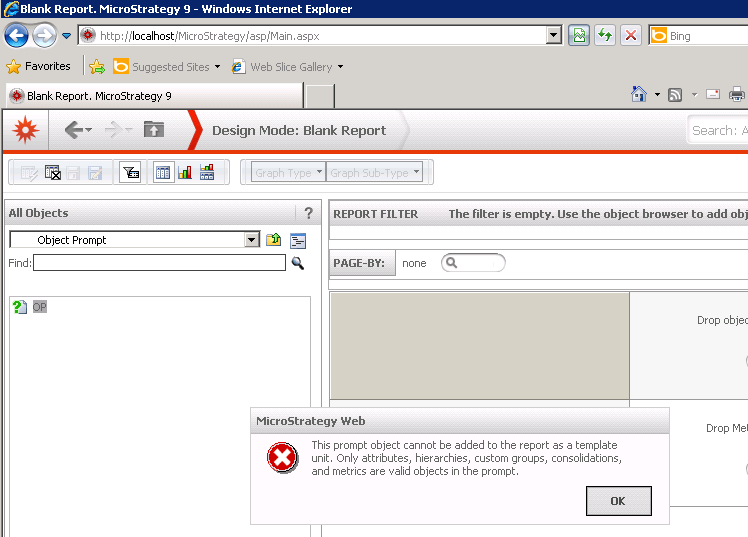
When adding an Object Prompt referencing a new search created for metrics in a specific folder to a report from Web, an error occurs.
The error message is below:
 

ka04W000001Ix6JQAS_0EM4400000026AM.png


Sample Code/Error


This prompt object cannot be added to the report as a template unit. Only attributes, hierarchies, custom groups, consolidations, and metrics are valid objects in the prompt.

 
CAUSE:
This is a known issue in Strategy Web 9.4.1.
 
ACTION:
This issue has been addressed with Strategy 10. Upgrade to take advantage of the fix.

KB46758


Comment

0 comments

Details

Knowledge Article

Published:

June 14, 2017

Last Updated:

December 31, 2018