EducationSoftwareStrategy.com
StrategyCommunity

Knowledge Base

Product

Community

Knowledge Base

TopicsBrowse ArticlesDeveloper Zone

Product

Download SoftwareProduct DocumentationSecurity Hub

Education

Tutorial VideosSolution GalleryEducation courses

Community

GuidelinesGrandmastersEvents
x_social-icon_white.svglinkedin_social-icon_white.svg
Strategy logoCommunity

© Strategy Inc. All Rights Reserved.

LegalTerms of UsePrivacy Policy
  1. Home
  2. Topics

KB46763: Grouping section in a document does not hide after migration even though it has been hidden in source environment running in MicroStrategy Web 9.4.1 and above


Community Admin

• Strategy


In source environment, the document has a few attributes included in the grouping section. In Web, the user has disabled the display of the Grouping section in Web by unchecking Grouping option in Tools menu. However, after migrating the document from one project to another through object manager package, the Grouping section is not hidden if running in the destination project in Web.

SYMPTOM:
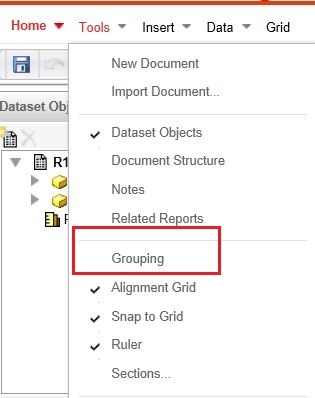
In source environment, the document has a few attributes included in the grouping section. In Web, the user has disabled the display of the Grouping section in Web by unchecking Grouping option in Tools menu.
However, after migrating the document from one project to another through object manager package, the Grouping section is not hidden if running in the destination project in Web.
 
STEPS TO REPRODUCE:
The steps below are performed within Tutorial project.
  • Create a report with Category, Year and Profit.
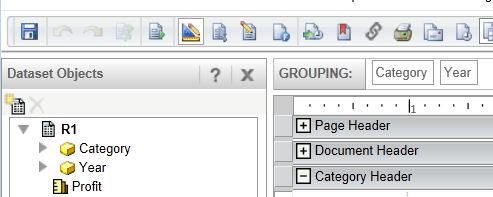
  • Create document with the report. Add Year and Category to Grouping section.
     
ka04W00000147t9QAA_0EM4400000026A6.jpeg
  • Edit document in Web. Go to Tools -> uncheck Grouping.
     
ka04W00000147t9QAA_0EM4400000026A8.jpeg
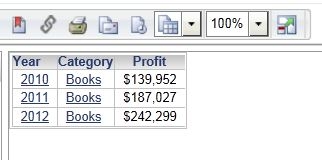
  • Execute the document and verify that the Grouping section does not show. Save document.
     
ka04W00000147t9QAA_0EM4400000026AA.jpeg
  • Use Object Manager to migrate the document from source project to target project.
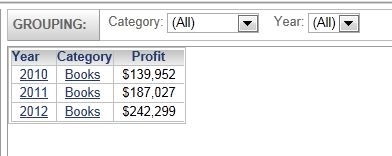
  • Run document in target project in Web. Notice that the Grouping section is exposed to users.
     
ka04W00000147t9QAA_0EM4400000026A4.jpeg

 
CAUSE:
The Show / Hide Grouping behavior is set at the Strategy Web front end. The current design is to display the grouping section by default, (regardless of the cookie settings), when opening the document if that group by section is not empty. When we make a change, it is stored the browser cache or cookie and will not be persisted into the document's definition, so once you open the same document in a different browser or machine, the change will be lost. 
As of May 2023 Strategy has no plans no change this behavior.


Comment

0 comments

Details

Knowledge Article

Published:

June 23, 2017

Last Updated:

June 23, 2017