SYMPTOM:
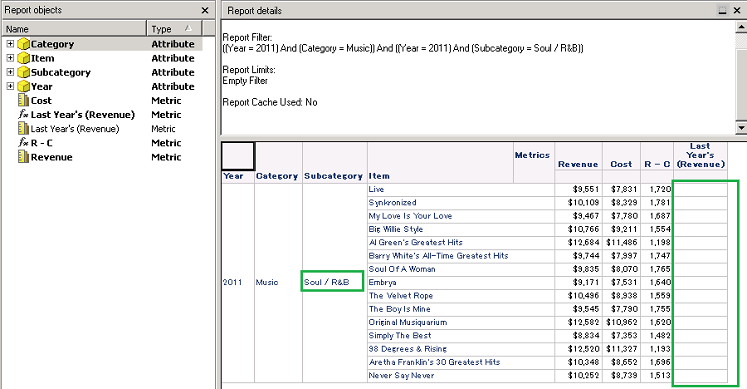
Transformation metric values do not appear on the report after drilling for a second time in a row.
This issue occurs if the report has both a derived metric using a transformation and another derived metric like a simple metric.
This image is below:
The sample report has these objects In Strategy Tutorial Project:
Year, Category
Revenue, Cost,
"R-C" :Simple Metric defines "Revenue - Cost" by Derived Metric ,
"Last Year's (Revenue)" : Transformation Metric defines "Revenue {~} | | " by Derived Metric .
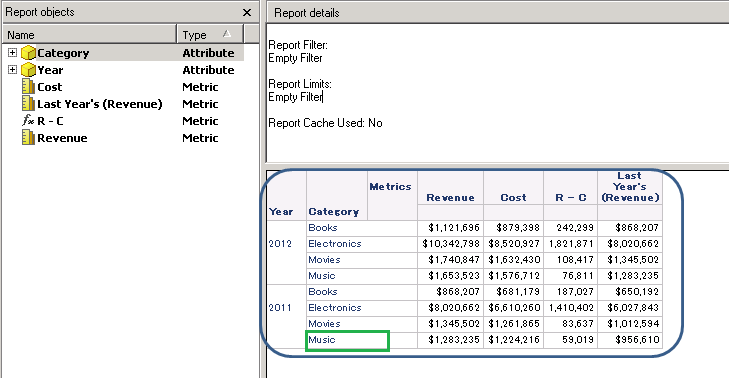
1.Drill on 'Music' the first time, There is no problem:

2.Drill on 'Soul /R&B' the second time, this issue happens. We cannot see the Transformation Metric values:
CAUSE:
This is a known issue in Strategy 9.4.1.
ACTION:
This issue has been addressed in Strategy Analytics Enterprise 9.4.1. Hotfix 3. Upgrade to this version to take advantage of the fix
WORKAROUND:
If you cannot upgrade, we have a workaround:
Basically this issue involves a drill from A->B->C, thus we can build report 1 with A and other objects; report 2 with B and the same other objects; report 3 with C and the same other objects. Then make a link (either hyperlink or edit link) from report 1 to report 2, and another from report 2 to report 3. Then we can link from report 1 to report 2 then to report 3 to mimic the drilling result.
