SUMMARY:
Strategy Web 9.x does not support the use of Internet Explorer's Compatibility View mode, as per Technote 43020. Because this setting is on the client browser-level, there are no Strategy settings to force browsers not to use this mode. However, Microsoft has made available certain HTML codes to instruct browsers to prefer non-Compatibility View Mode. By inserting special Microsoft code in the Strategy Web deployment, this will help prevent the use of the unsupported Compatibility View Mode.
NOTE: There are certain browser-specific settings that will override this workaround. If these settings are enabled, users must manually disable these overrides.
SYMPTOM:
When using Microsoft Internet Explorer's Compatibility View Mode setting, many elements within Strategy Web Universal will cease to function or display properly. For example: menu bars may not render, missing dialog boxes, large amounts of white space, missing buttons, etc.
On Internet Explorer 8, the Compatibility Mode icon appears pressed when enabled:

On Internet Explorer 9 and 10, the Compatibility Mode icon appears blue when enabled:

CAUSE:
Compatibility View Mode is an unsupported browser configuration. Compatibility View Mode "emulates" lower versions of Internet Explorer by modifying or disabling feature sets and rendering engine components. This can cause instability with the rendering of Strategy Web Universal 9.x, and may seriously degrade the user experience.
ACTION:
Discontinue use of Microsoft Internet Explorer's Compatibility View Mode. Refer to the Strategy Web Readme for a list of all supported browsers and modes.
WORKAROUND:
1. Browser to the Strategy Web Universal deployment folder
2. In the JSP folder, edit "mstrWeb.jsp"
3. Insert the following code under the <head> tag:
Sample Code/Error
<meta http-equiv="X-UA-Compatible" content="IE=edge" />
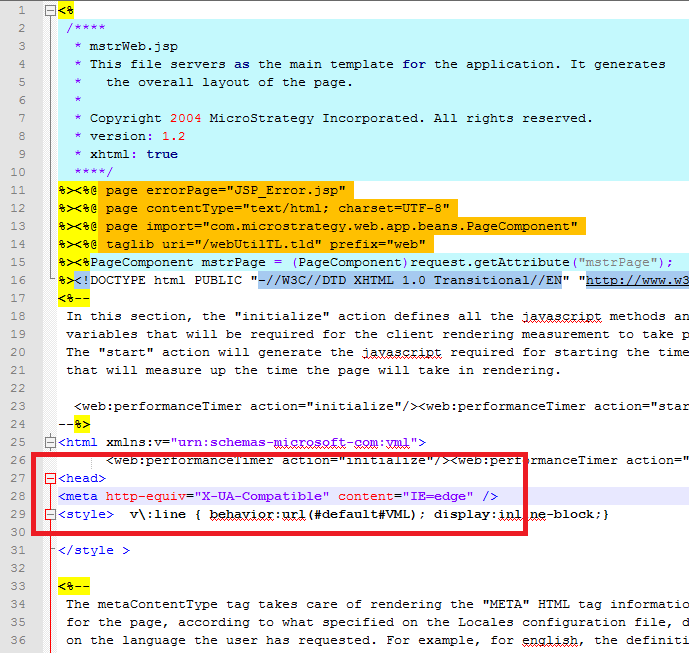
4. Save the file.
5. If there are any Web content server Temp/Temporary folders or Caches, clear them.
6. Clear all client browser caches
7. Restart the Web content server
NOTE: This META tag is not a guarantee that Compatibility Mode will be disabled. There are known settings that will override this, such as "Use Compatibility Mode for All Sites" on the browser level. For the machines that have these overrides enabled, they must either be disabled by the System Administrator or User. For example:
TO LEARN MORE:
Related technotes
Technote 43020: Is Internet Explorer in Compatibility View Mode supported for Strategy Web 9.x?
Technote 43353: How to configure Microsoft IIS 7 to allow most websites with compatibility view mode on except for Strategy Web 9.x?
Third Party Software Installation Warning:
The third-party product(s) discussed in this technical note are manufactured by vendors independent of Strategy. Strategy makes no warranty, express, implied or otherwise, regarding these products, including their performance or reliability.
