Strategy Web 9.4.1 users and administrators have the ability to enable the Web Preference "Preserve white space in prompt answers and filter expressions" located under User Preferences/Project Defaults > General > Qualification as shown below:

This setting only takes effect when answering metric or attribute qualification prompts and when entering multiple values like using the operator IN or NOT IN.
If the user enters the values as shown below:
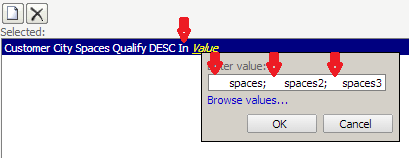
Notice that in the image above some extra spaces were introduced at the beginning of each value to demonstrate the effect of this setting, these are denoted with red arrows.
The result entry after clicking OK will vary depending on the value of the setting "Preserve white space in prompt answers and filter expressions" as explained below:
CHECKED
The entry will be kept literally to what the user inputs as shown below:

UNCHECKED
The entry will be sanitized and the spaces at the beginning removed as shown below:

On both cases, the entry shown in the blue line will be used to generate the SQL specific to this prompt.
