A MovingSum takes two parameters:
MovingSum(value list, window size),
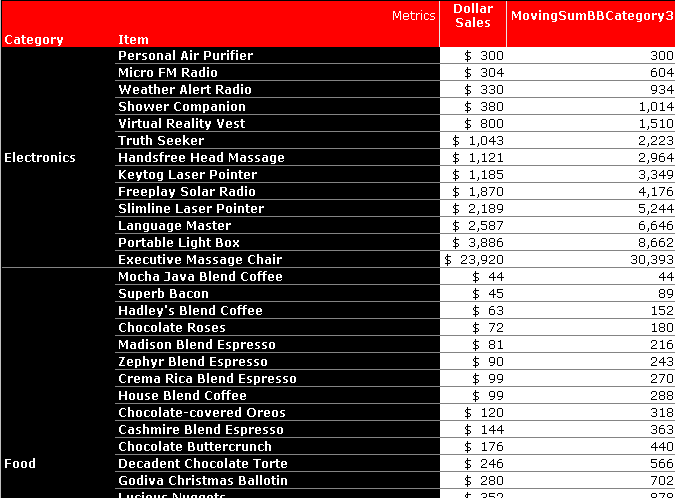
In this report, MovingSumBBCategory3 is the moving sum of the fact dollar sales. Therefore, dollar sales is the value list. The window size parameter in this case is '3'. The moving sum then, is a calculation of the last '3' dollar sales all the way down the column.
For example, shower companion, in the fourth row, is '1, 014', the sum of shower companion, weather alert radio and micro FM radio. Virtual reality vest, in the fifth row, is '1,510', the sum of virtual reality vest, shower companion and weather alert radio.
To create a MovingSum metric, go to the metrics folder and create a new metric. The MovingSum function is found in schema objects > functions and operators > functions > OLAP functions.
Fill in the function parameters appropriately by adding a fact, a comma (,), and then the MovingSum window (a number) as the second parameter. Save and close the metric. Finally, put in on the report.
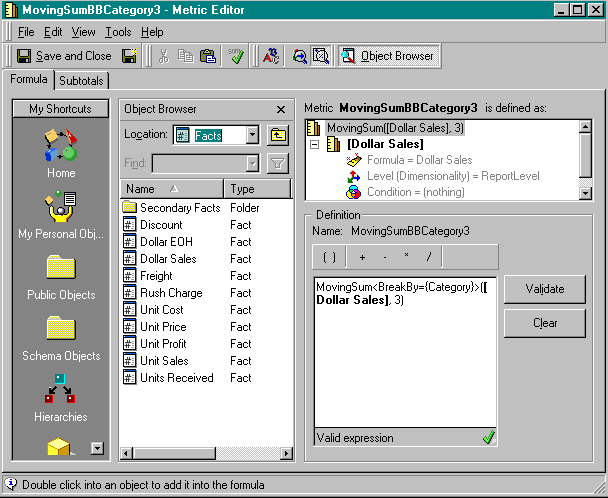
Users can also use the BreakBy or SortBy functional parameters. For information regarding this, please reference KB5700-007-0068.
