EducationSoftwareStrategy.com
StrategyCommunity

Knowledge Base

Product

Community

Knowledge Base

TopicsBrowse ArticlesDeveloper Zone

Product

Download SoftwareProduct DocumentationSecurity Hub

Education

Tutorial VideosSolution GalleryEducation courses

Community

GuidelinesGrandmastersEvents
x_social-icon_white.svglinkedin_social-icon_white.svg
Strategy logoCommunity

© Strategy Inc. All Rights Reserved.

LegalTerms of UsePrivacy Policy
  1. Home
  2. Topics

KB46801: "The metric definition has an error. Please correct before proceeding." error message appears when switching to Function Editor from Formula Editor in the Metric Editor of MicroStrategy Web 9.4.1


Community Admin

• Strategy


After setting Number and Date Format language to "Italian (Italy)" under MicroStrategy Web preferences, the following error message is shown in the Metric Editor when using a function with more than one argument and switching to Function Editor from Formula Editor.

SYMPTOM:
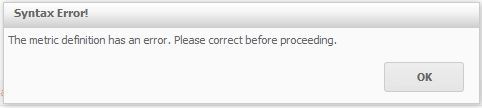
After setting Number and Date Format language to "Italian (Italy)" under Strategy Web preferences, the following error message is shown in the Metric Editor when using a function with more than one argument and switching to Function Editor from Formula Editor:
ka04W000000OdjnQAC_0EM44000000266i.png


The metric definition has an error. Please correct before proceeding.
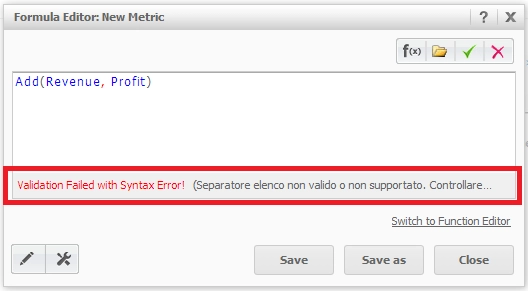
 
When clicking "OK", the following message is shown below the formula:

ka04W000000OdjnQAC_0EM44000000266k.png


Validation Failed with Syntax Error!

 
CAUSE:
The list separator used automatically by the Metric Editor in Strategy Web does not match the one defined for the locale selected in the Date and Number Format language preferences.
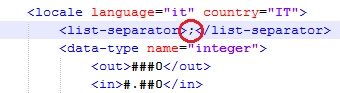
In this case case, semicolons are defined as list separators by default for the locale "Italian (Italy), whilst the metric editor automatically uses commas.
 
This is a known issue in Strategy Web 9.4.1.
 
WORKAROUND:
The following workaround are suitable for this issue:
 
1. Manually correct the wrong separators with the correct ones in the metric formula (in this case, change commas with semicolons);
 
2. Modify the separator defined for the locale selected in the Date and Number Format language preferences. An existing locale can be modified by editing the 'format_config.xml’ file. For Windows operating systems running an ASP version of Strategy Web, this is usually located in the web server machine inside the following folder:
 
<Strategy installation path>\Web ASPx\WEB-INF\xml
 
For changing the list separators used for a certain locale, modify the following line once locating the desired locale (in this case "Italian (Italy)"):
 

ka04W000000OdjnQAC_0EM44000000266n.png


CUSTOMIZATION WARNING:
This customization is provided as a convenience to Strategy users and is only directly applicable to the version stated. While this code may apply to other releases directly, Strategy Technical Support makes no guarantees that the code provided will apply to any future or previous builds. In the event of a code change in future builds, Strategy Technical Support makes no guarantee that an updated version of this particular customization will be provided. In the event of a code change in future builds, Strategy may not be able to provide additional code on this matter even though this customization is provided at this time for this specific build. For enhancements to this customization or to incorporate similar functionality into other versions, contact your Account Executive to inquire about Strategy Consulting assistance. 


Comment

0 comments

Details

Knowledge Article

Published:

June 19, 2017

Last Updated:

June 19, 2017