SYMPTOM:
The Strategy 9.4.1 update 2 App will crash when there is a custom group object within the "break by" or "color by" of the visualization on the document. The Custom group needs to meet some criteria. Specifically, the display options for the Custom group have to be set to option 1 "Show only the element names on the Report". This is reproduced by creating a Custom group and setting the display option to option 1 then creating a Report with this Custom group and other objects. Next create a Visual Insight document and add the Custom group to the break-by or color-by section. When running this in mobile it will crash.
CAUSE:
This is caused by a defect in the Strategy 9.4.1 update 2 mobile App. Please contact Technical Support for more information on the implementation of this Fix.
ACTION:
This issue has been fix confirmed in Strategy mobile App 9.4.1 update 3. for iOS. Please update to the latest version to take advantage of the fix.
WORKAROUND:
Using Web, access the documents that crash in mobile. Upon viewing them you should see some custom groups in the "break by" or "color by" as seen in the Tutorial Example below.
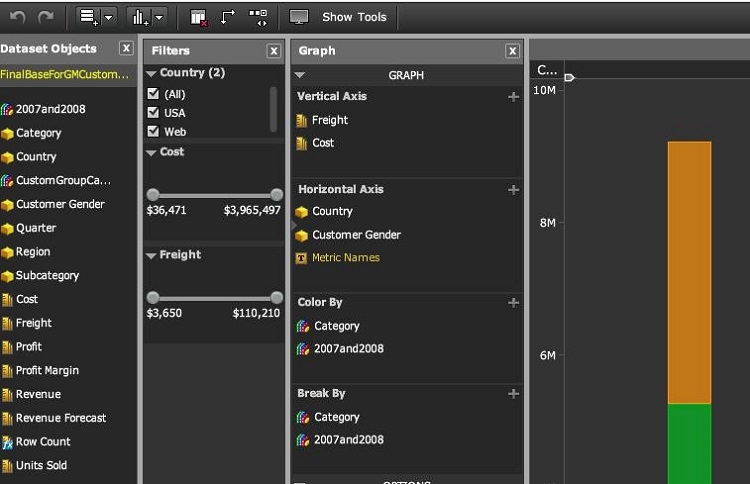
Once these custom groups are identified, navigate to them in Desktop and edit them. When editing, you can right click the custom group element and select "Show Display Options".
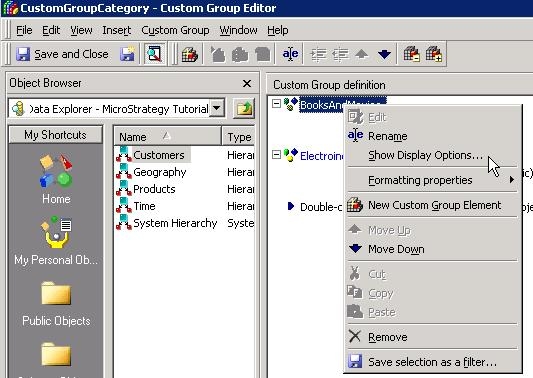
Within here, you can switch the value to use option 2 "Show only the individual items within this element".
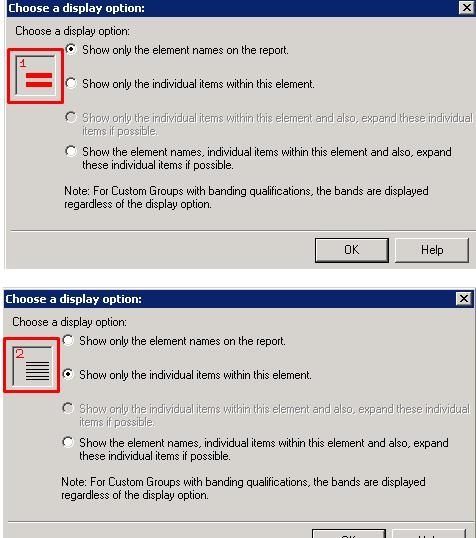
Rerun the document in mobile and it will no longer crash.
