There may be a need to move a Visual Insight analysis across projects in Strategy. This technical note outlines how to migrate the object without having to recreate the underlying cube.
1. In Object Manager, open the project where the Visual Insight analysis exists. Create a package and add the Visual Insight analysis.
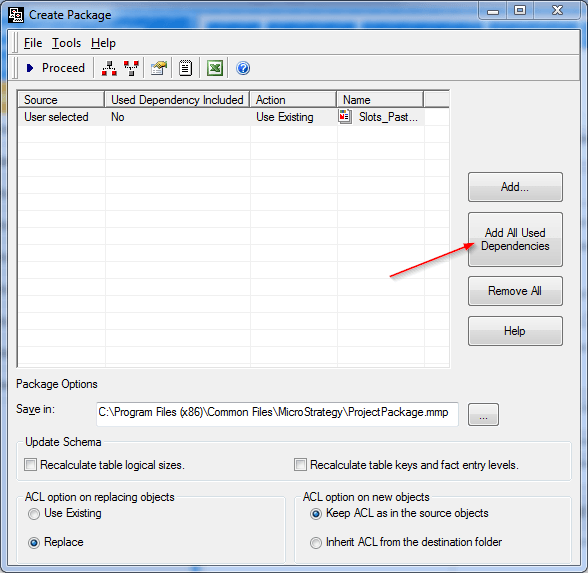
2. After adding the analysis, hit the "Add All Used Dependencies" button. This should add the underlying cube the Analysis is based on.
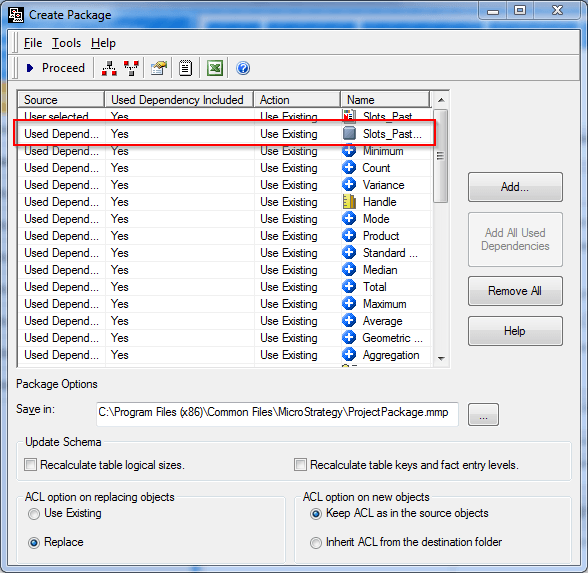
3. Create the package, and import it into the destination project.
4. Republish the new cube in Web after it's imported. The analysis should run without issues.
Note: If the underlying Excel file is unavailable for use, users can follow KB32618 to collect cube files from one server and restore them on another.
Note: The cube's underlying data file does not have to be on the Intelligence Server machine. It needs access to the file once on the machine that is publishing the cube.
