EducationSoftwareStrategy.com
StrategyCommunity

Knowledge Base

Product

Community

Knowledge Base

TopicsBrowse ArticlesDeveloper Zone

Product

Download SoftwareProduct DocumentationSecurity Hub

Education

Tutorial VideosSolution GalleryEducation courses

Community

GuidelinesGrandmastersEvents
x_social-icon_white.svglinkedin_social-icon_white.svg
Strategy logoCommunity

© Strategy Inc. All Rights Reserved.

LegalTerms of UsePrivacy Policy
  1. Home
  2. Topics

KB46864: Y1 axis Value Title is rotated 180 degrees when using Japanese vertical font in MicroStrategy 9.x.


Stefan Zepeda

Salesforce Solutions Architect • Strategy


Y1 axis Value Title is rotated 180 degrees when using Japanese vertical font in MicroStrategy 9.x

SYMPTOM:
Y1 value title is rotated 180 degrees when using a vertical font like @MSP Gothic as seen below:

ka02R000000kYPDQA2_0EM440000002CNe.png

 
In Y2 axis, the Japanese data label is displayed correctly.
 
CAUSE:
When using Automatic layout, the rotation for Y1 Value title is set to 90 degrees. 
 
ACTION:
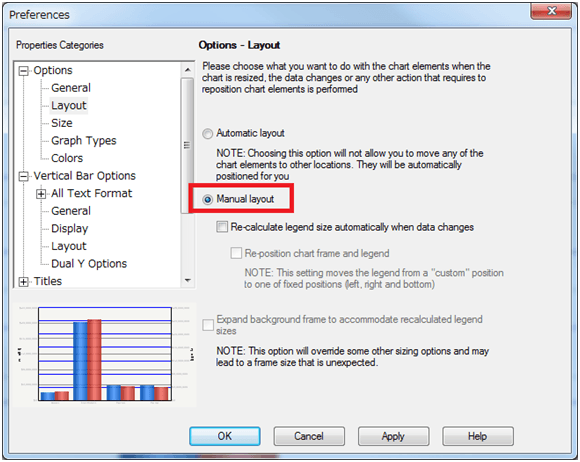
  • Choose Manual layout in the Graph preferences. 
ka02R000000kYPDQA2_0EM440000002CNf.png
  • Set the Rotation for Y1 Value title to 270 degrees.


Comment

0 comments

Details

Knowledge Article

Published:

June 8, 2017

Last Updated:

June 8, 2017