EducationSoftwareStrategy.com
StrategyCommunity

Knowledge Base

Product

Community

Knowledge Base

TopicsBrowse ArticlesDeveloper Zone

Product

Download SoftwareProduct DocumentationSecurity Hub

Education

Tutorial VideosSolution GalleryEducation courses

Community

GuidelinesGrandmastersEvents
x_social-icon_white.svglinkedin_social-icon_white.svg
Strategy logoCommunity

© Strategy Inc. All Rights Reserved.

LegalTerms of UsePrivacy Policy
  1. Home
  2. Topics

KB46866: Derived metric displays null in dynamic text targeted by slice selector with derived element as source in MicroStrategy Analytics Enterprise Web and Developer


Community Admin

• Strategy


This article describes a cause for null dynamic text boxes when targeted by selectors in MicroStrategy

SYMPTOM:
Derived metric displays null in dynamic text targeted by slice selector with derived element as source in Strategy Analytics Enterprise Web and Developer.
 
The following steps demonstrate how to reproduce the issue in Strategy Tutorial:
Profit Margin=(Revenue-Cost)/Revenue
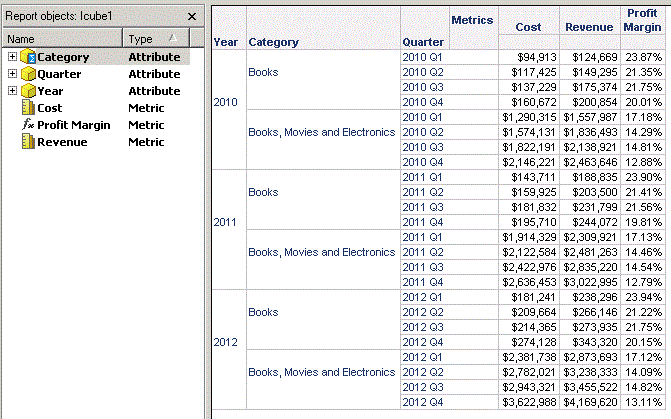
  1. Create Intelligent Cube report with derived metric and derived element as shown below:
ka04W000000OfOJQA0_0EM440000002CMX.gif


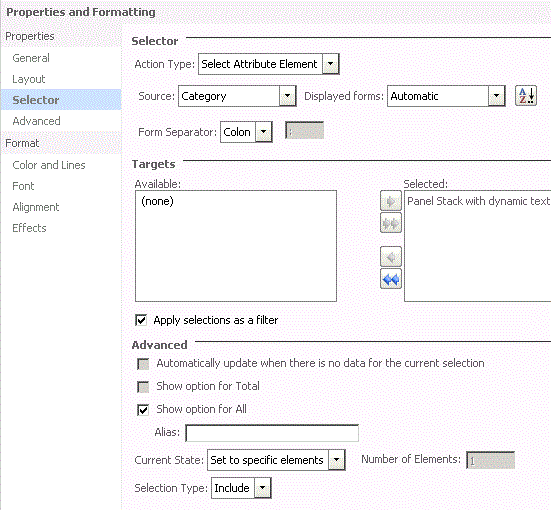
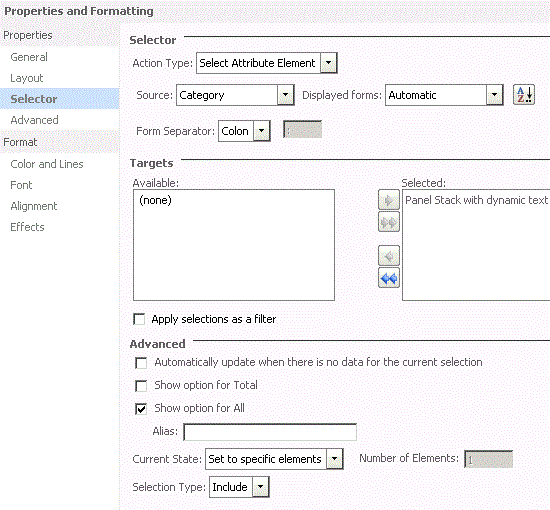
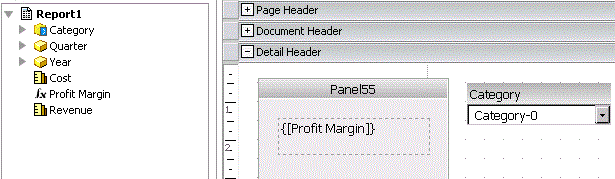
  • Create a document with this cube report as dataset. Insert one panel stack and add dynamic text with Profit Margin. Insert attribute element selector which uses derived element Category as source and targets on the panel stack as shown below:
ka04W000000OfOJQA0_0EM440000002CMQ.gif


  • When "Apply selections as a filter" is checked, the derived metric can return correct data as shown below:
ka04W000000OfOJQA0_0EM440000002CMa.gif


  • But, if "Apply selections as a filter" is unchecked, derived metric displays null as shown below:
ka04W000000OfOJQA0_0EM440000002CMZ.gif


CAUSE:
The cause for this issue is that Strategy Analytic Engine calculates derived metric and derived element in default evaluation order in dynamic text. In default evaluation order, derived metric is calculated before derived element and would display null due to dynamic aggregation issue. The detail explanation is illustrated in the tech note below:
 
KB31063: In MicroStrategy Devoloper and Web, adding derived elements to a report causes a derived metric to display aggregation nulls --
 
There is no option to change the evaluation order in dynamic text. There is already an enhancement request for this ability.
 
ACTION:
Contact Strategy Technical Support for the latest status of the enhancement request.
 
WORKAROUND:
Use a grid with this derived metric to replace dynamic text. Users can uncheck " Use default evaluation order" and set correct evaluation order to make derived element calculated before derived metric in Grid Data Options in Developer by following tech note below:
 
KB17570: How to change the evaluation order of a dashboard to reflect the evaluation order set on the underlying dataset in MicroStrategy
 
Then, change grid formatting and size of column and row to make the grid display the same as dynamic text.  


Comment

0 comments

Details

Knowledge Article

Published:

April 12, 2017

Last Updated:

April 12, 2017