EducationSoftwareStrategy.com
StrategyCommunity

Knowledge Base

Product

Community

Knowledge Base

TopicsBrowse ArticlesDeveloper Zone

Product

Download SoftwareProduct DocumentationSecurity Hub

Education

Tutorial VideosSolution GalleryEducation courses

Community

GuidelinesGrandmastersEvents
x_social-icon_white.svglinkedin_social-icon_white.svg
Strategy logoCommunity

© Strategy Inc. All Rights Reserved.

LegalTerms of UsePrivacy Policy
  1. Home
  2. Topics

KB46869: “The UserId, Password or Account is invalid. “ error occurs when login to Teradata 13 warehouse if the password using special characters in MicroStrategy Analytics Enterprise 9.4.1


Community Admin

• Strategy


In MicroStrategy Analytics Enterprise 9.4.1, “The UserId, Password or Account is invalid. “ error occurs when running reports or launching warehouse catalog or login DB Query tool against Teradata 13 warehouse with Teradata ODBC driver 14.1 if password contains special characters.
SYMPTOM:
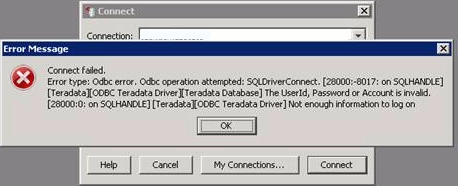
In Strategy Analytics Enterprise 9.4.1, “The UserId, Password or Account is invalid. “ error occurs when running reports or launching warehouse catalog or login DB Query tool against Teradata 13 warehouse with Teradata ODBC driver 14.1 if password contains special characters.
 

ka04W000000OhLCQA0_0EM440000002JCQ.png


The UserId, Password or Account is invalid.
Not enough information to log on.

 
In DSSErrors.log, below entries are observed:

(QueryEngine encountered error: Connect failed.

Error type: Odbc error. Odbc operation attempted: SQLDriverConnect. The UserId, Password or Account is invalid.Unable to get catalog string. Unable to get catalog string. Connection String: DSN=xxxx;UID=xxxx;.. Error in Process method of Component: QueryEngineServer, Project xxx, Job xxxx, Error Code= -2147212544.)
The issue happens in Strategy Analytics Enterprise 9.4.1 in conjunction with all current Teradata ODBC Drivers.
The error don’t happen to all special characters. It happen to following characters but not limited to.
= + # % ! ;

 
CAUSE:
Contact Strategy Technical Support for an explanation on the precise cause of this issue.
 
ACTION:
Avoid using special characters like  = + # % ! ; in DB login.
Or
Contact Teradata to obtain ODBC patch based on the Intelligence Server operating system.


Comment

0 comments

Details

Knowledge Article

Published:

May 25, 2017

Last Updated:

May 25, 2017