EducationSoftwareStrategy.com
StrategyCommunity

Knowledge Base

Product

Community

Knowledge Base

TopicsBrowse ArticlesDeveloper Zone

Product

Download SoftwareProduct DocumentationSecurity Hub

Education

Tutorial VideosSolution GalleryEducation courses

Community

GuidelinesGrandmastersEvents
x_social-icon_white.svglinkedin_social-icon_white.svg
Strategy logoCommunity

© Strategy Inc. All Rights Reserved.

LegalTerms of UsePrivacy Policy
  1. Home
  2. Topics

KB46880: Multiple elements are highlighted when using an attribute with compound key as a selector in Visual Insight and MicroStrategy Web 9.4.1.


Community Admin

• Strategy


Multiple elements are highlighted when using an attribute with compound key as a selector in Visual Insight and MicroStrategy Web 9.4.1.

SYMPTOM:
 
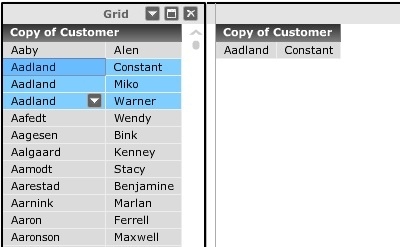
In Visual Insight in Strategy Web 9.4.1, an attribute in a grid can be used as selector to target other grids in the same dashboard. When the attribute used as a selector has a compound key, i.e. multiple attribute forms conform the ID form, any element that matches at least one of the ID's will become highlighted, like shown below.
ka04W000000OdtnQAC_0EM44000000269M.jpeg

 
Selecting Aadland Constant, will also highlight Aadland Miko and Aadland Warner. The expected behavior is that only the element whose compound key matches on both of the ID forms is highlighted and not the ones that match just one of them.
 
STEPS TO REPRODUCE:

  • Copy the customer attribute in the Strategy Tutorial Project.
  • Make the First name and Last name DESC forms into the ID form.
  • Then, delete the ID form and all parents/children as seen below:
ka04W000000OdtnQAC_0EM44000000268z.png
  • Place this new attribute in a report.
  • Create a Visual Insight Analysis with it.
  • Add the customer attribute to the rows and add in an additional grid object to the layout.
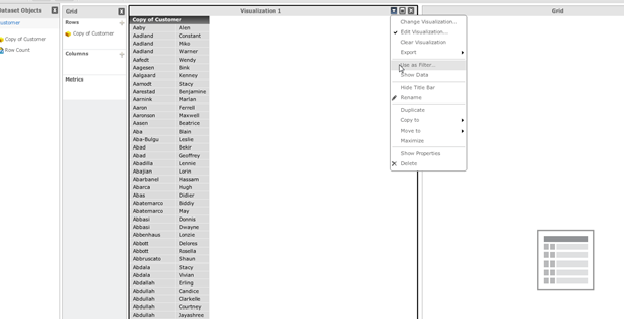
  • Set this layout to be used 'as filter', like seen below:
ka04W000000OdtnQAC_0EM44000000269N.png
  • Under Filtering Options, select "Grid", "Enable filtering on selection", and 'Allow users to clear all selections", as seen below:
ka04W000000OdtnQAC_0EM44000000269P.png
  •  Click on any element where the Last Name form repeats, such as Aadland, and notice that all elements with the last name Aadland become highlighted.

CAUSE:
 
This is a known issue with Visual Insight in Strategy Web 9.4.1.
 
ACTION:
 
This issue has been fixed in Strategy 9.4.1 Hotfix 5. Take advantage of upgrading for a fix. 
 
WORKAROUND:
 
Avoid using compound attribute keys if this problem is encountered.


Comment

0 comments

Details

Knowledge Article

Published:

June 15, 2017

Last Updated:

June 15, 2017