EducationSoftwareStrategy.com
StrategyCommunity

Knowledge Base

Product

Community

Knowledge Base

TopicsBrowse ArticlesDeveloper Zone

Product

Download SoftwareProduct DocumentationSecurity Hub

Education

Tutorial VideosSolution GalleryEducation courses

Community

GuidelinesGrandmastersEvents
x_social-icon_white.svglinkedin_social-icon_white.svg
Strategy logoCommunity

© Strategy Inc. All Rights Reserved.

LegalTerms of UsePrivacy Policy
  1. Home
  2. Topics

KB46882: Mapping method of fact expression does not match between English and Japanese interface in MicroStrategy Developer 9.4.1 Hotfix 2.


Stefan Zepeda

Salesforce Solutions Architect • Strategy


Mapping method of fact expression does not match between English and Japanese interface in MicroStrategy Developer 9.4.1 Hotfix 2.

SYMPTOM
In Strategy Developer 9.4.1 Hotfix 2, the mapping method of fact expression does not match between the English and Japanese interfaces.
 
STEPS TO REPRODUCE
Follow the steps below to reproduce the issue with Strategy Tutorial project:
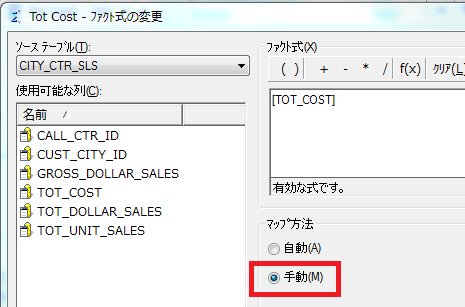
  • Open Strategy Developer in the Japanese interface.
  • Create a new fact and set the mapping method to 手動(Manual), as shown in the image below:
ka02R000000kcFMQAY_0EM440000002CNW.png
  • Close Strategy Developer.
  • Open Strategy Developer in the English interface.
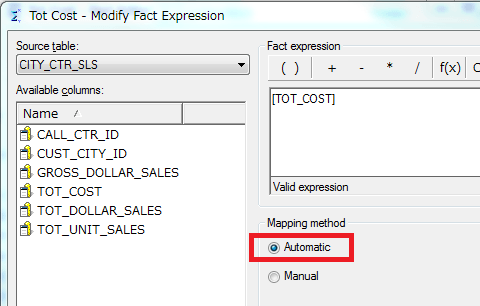
  • Edit the fact created at Step_2 and note that the mapping method is displayed as Automatic.
ka02R000000kcFMQAY_0EM440000002CNY.png

CAUSE
This is a known issue with Strategy Developer 9.4.1 Hotfix 2.
 
ACTION
Contact Strategy Technical Support for an update on the status of this issue


Comment

0 comments

Details

Knowledge Article

Published:

May 17, 2017

Last Updated:

May 17, 2017