EducationSoftwareStrategy.com
StrategyCommunity

Knowledge Base

Product

Community

Knowledge Base

TopicsBrowse ArticlesDeveloper Zone

Product

Download SoftwareProduct DocumentationSecurity Hub

Education

Tutorial VideosSolution GalleryEducation courses

Community

GuidelinesGrandmastersEvents
x_social-icon_white.svglinkedin_social-icon_white.svg
Strategy logoCommunity

© Strategy Inc. All Rights Reserved.

LegalTerms of UsePrivacy Policy
  1. Home
  2. Topics

KB46899: Null values are not sorted properly using MicroStrategy Analytics Enterprise Web with Visual Insight.


Community Admin

• Strategy


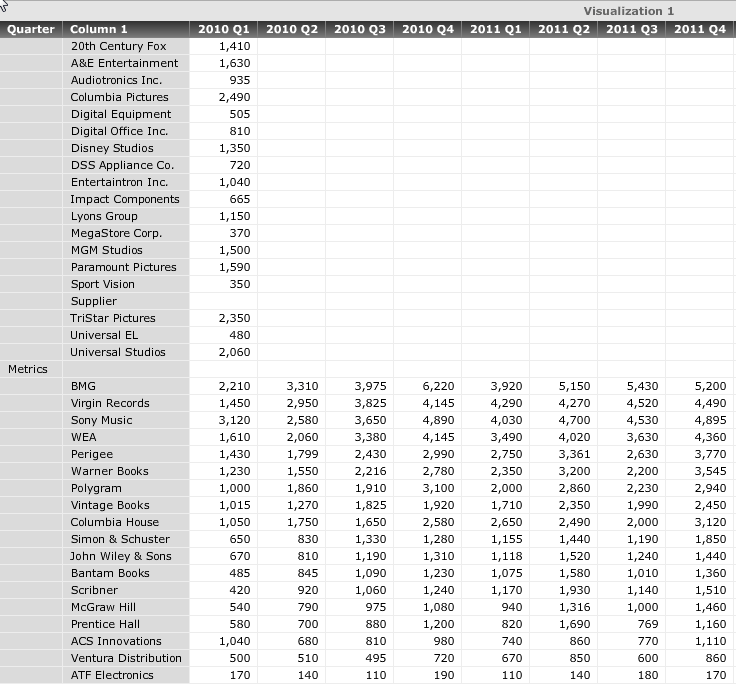
In MicroStrategy Analytics Enterprise Web 9.4.1 Visual Insight, when sorting null values from a data import, they will always appear at the top of the grid even when sorting descending

SYMPTOM:
In Strategy Analytics Enterprise Web 9.4.1 Visual Insight, when sorting null values from a data import, they will always appear at the top of the grid even when sorting descending, like shown below.
 

ka04W000000OdgfQAC_0EM44000000268L.png

When sorting descending, the expectation should be to sort them to the bottom of the grid.
 
STEPS TO REPRODUCE:

  1. Export a report to excel from Strategy Tutorial.
  2. Delete several cells with data so they cells are now null.
  3. Use data import to upload this excel file into Strategy Analytics Enterprise Web 9.4.1.
  4. Add the attributes and metrics to a Visual Insight Dashboard.
  5. Notice that the nulls still display and appear at the top.

CAUSE:
This is a known issue with Strategy Analytics Enterprise Visual Insight 9.4.1.
 
ACTION:
Strategy will continue to investigate and post updates as soon as they are available.
 
WORKAROUND:
This issue only occurs when nulls are blank cells. If NULL is keyed into each blank cell, the issue will not occur.


Comment

0 comments

Details

Knowledge Article

Published:

April 6, 2017

Last Updated:

April 6, 2017