EducationSoftwareStrategy.com
StrategyCommunity

Knowledge Base

Product

Community

Knowledge Base

TopicsBrowse ArticlesDeveloper Zone

Product

Download SoftwareProduct DocumentationSecurity Hub

Education

Tutorial VideosSolution GalleryEducation courses

Community

GuidelinesGrandmastersEvents
x_social-icon_white.svglinkedin_social-icon_white.svg
Strategy logoCommunity

© Strategy Inc. All Rights Reserved.

LegalTerms of UsePrivacy Policy
  1. Home
  2. Topics

KB46900: The Waterfall widget drops x-axis labels in MicroStrategy Web 9.3.x and above.


Community Admin

• Strategy


The Waterfall widget drops x-axis labels in MicroStrategy Web 9.3.x and above.

SYMPTOM:
 
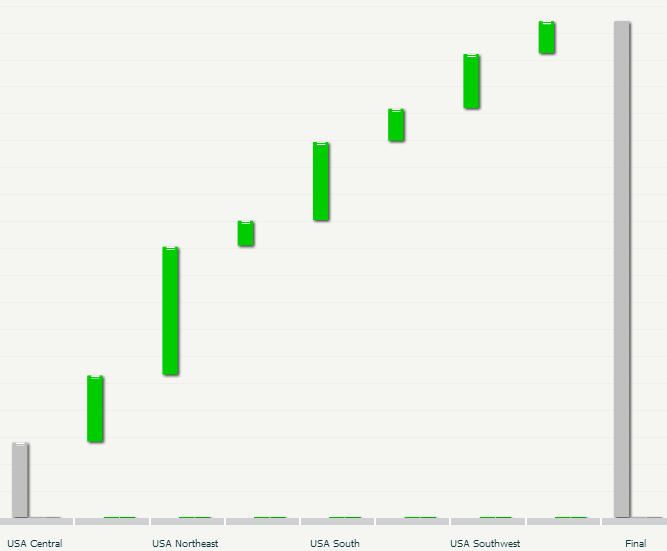
When using a Waterfall widget in Strategy Web 9.3.x and above, the widget will not show all the names for all x-axis values, while still displaying the data, as shown below:
ka04W000001MKwjQAG_0EM44000000268V.png

Note: The x-axis label between USA Central and USA Northeast is not shown.
 
CAUSE:
 
This is working as designed in Strategy Web 9.3.x. The waterfall widget was designed to hide or drop x-axis labels if they would crowd the axis area.
 
ACTION:
 
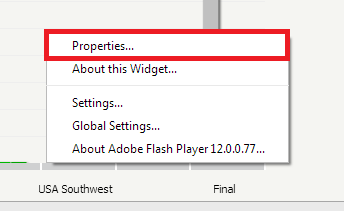
Go to Flash mode to access the widget properties, by right clicking on the widget, as seen below:
ka04W000001MKwjQAG_0EM44000000268U.png

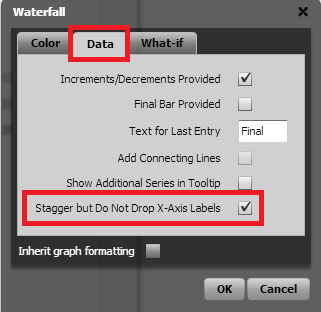
Once in the properties of the widget, navigate to the Data tab and check the box 'Stagger but Do Not Drop X-Axis Labels', as seen below:
ka04W000001MKwjQAG_0EM44000000268T.png

 
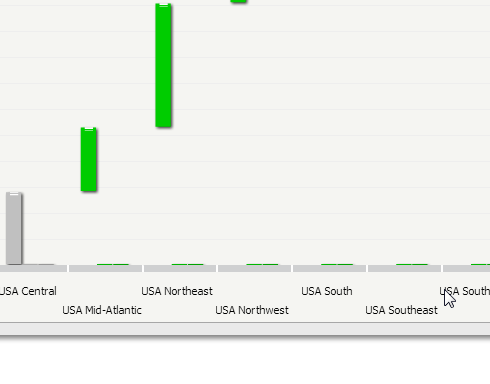
Once this setting is checked, all x-axis values will be shown in a staggered manner, as seen below:
ka04W000001MKwjQAG_0EM44000000268S.png


Comment

0 comments

Details

Knowledge Article

Published:

April 3, 2017

Last Updated:

April 3, 2017