EducationSoftwareStrategy.com
StrategyCommunity

Knowledge Base

Product

Community

Knowledge Base

TopicsBrowse ArticlesDeveloper Zone

Product

Download SoftwareProduct DocumentationSecurity Hub

Education

Tutorial VideosSolution GalleryEducation courses

Community

GuidelinesGrandmastersEvents
x_social-icon_white.svglinkedin_social-icon_white.svg
Strategy logoCommunity

© Strategy Inc. All Rights Reserved.

LegalTerms of UsePrivacy Policy
  1. Home
  2. Topics

KB46901: Horizontal grouping does not work for the Group By set to "All" in MicroStrategy Mobile 9.4.1


Community Admin

• Strategy


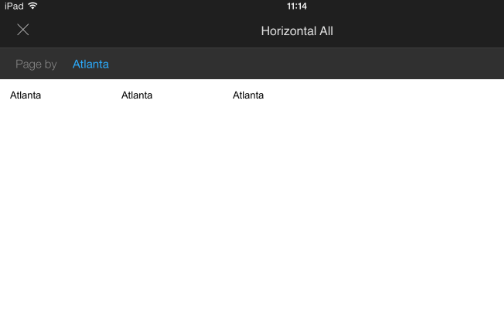
This document discusses the behavior that the Horizontal grouping does not work for the Group By set to "All" on iPad.

SYMPTOM:
In Strategy Mobile 9.4.1, when an attribute is set to be grouped horizontally, it displays as intended when a single attribute is selected in the group by dropdown, as shown below:
 

ka04W000000OhooQAC_0EM440000002A6B.png


However, when the group by dropdown is set to All, the attribute fails to render horizontally, as shown below:
 

ka04W000000OhooQAC_0EM440000002A69.png


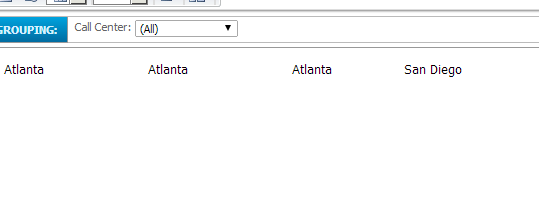
Below is what is supposed to display, as seen in Strategy Web:
 

ka04W000000OhooQAC_0EM440000002A60.png

 
Notice that after Atlanta repeats 3 times, San Diego still appears to the right of it.
 
CAUSE:
 
This is a limitation with Strategy Mobile 9.4.1, as horizontal grouping on Mobile for the All option is not currently supported. A request has been logged to address this issue.
 
ACTION:
Contact Strategy Technical Support for an update on this issue.
 
The Strategy Internal Reference Number for the issue discussed in this technical note is 755565.


Comment

0 comments

Details

Knowledge Article

Published:

April 11, 2017

Last Updated:

April 11, 2017