EducationSoftwareStrategy.com
StrategyCommunity

Knowledge Base

Product

Community

Knowledge Base

TopicsBrowse ArticlesDeveloper Zone

Product

Download SoftwareProduct DocumentationSecurity Hub

Education

Tutorial VideosSolution GalleryEducation courses

Community

GuidelinesGrandmastersEvents
x_social-icon_white.svglinkedin_social-icon_white.svg
Strategy logoCommunity

© Strategy Inc. All Rights Reserved.

LegalTerms of UsePrivacy Policy
  1. Home
  2. Topics

KB46903: Filter panels cannot clear, expand, or collapse selectors in MicroStrategy Mobile for iPad 9.3.1 and 9.4.1.


Community Admin

• Strategy


In MicroStrategy Mobile 9.4.1, users cannot clear or expand selectors contained in a filter panel.

SYMPTOM:
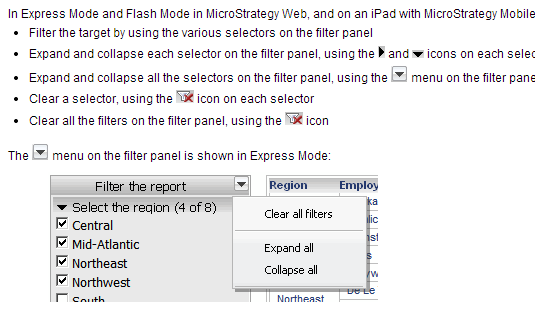
In the documentation for Strategy Mobile 9.3.1 and 9.4.1, it is noted that the filter panel can be used in Strategy Mobile for iPad in the same way that it can be used in Strategy Web. This includes using the filter panel to clear all selectors contained within it, as well as collapsing and expanding them. Shown below is the documentation in question:
ka04W000000OdV3QAK_0EM440000002A66.png

However, in Strategy Mobile 9.4.1, there is no way to accomplish these actions using the filter panel as there is no dropdown arrow and no touch controls for such a purpose.
CAUSE:
The documentation is incorrect, as this feature has never been supported in Strategy Mobile 9.3.1 or 9.4.1. 
ACTION:
This issue has been addressed in Strategy Mobile 9.5. Upgrade in order to take advantage of this fix. 


Comment

0 comments

Details

Knowledge Article

Published:

April 5, 2017

Last Updated:

April 5, 2017