EducationSoftwareStrategy.com
StrategyCommunity

Knowledge Base

Product

Community

Knowledge Base

TopicsBrowse ArticlesDeveloper Zone

Product

Download SoftwareProduct DocumentationSecurity Hub

Education

Tutorial VideosSolution GalleryEducation courses

Community

GuidelinesGrandmastersEvents
x_social-icon_white.svglinkedin_social-icon_white.svg
Strategy logoCommunity

© Strategy Inc. All Rights Reserved.

LegalTerms of UsePrivacy Policy
  1. Home
  2. Topics

KB46907: A parent slice selector displays no elements when its source attribute is not included in the grid in MicroStrategy Web 9.4.1 Hotfix 3.


Community Admin

• Strategy


n MicroStrategy Web 9.4.1 Hotfix 3, slice selectors can target other selectors to cascade selections before getting to an actual grid. If the selectors are of type slice, the parent selector will not show any elements when its source attribute is not included in the grid. This issue only occurs when the selector is being used as slice instead of filter, and when its only target is the child selector and not the grid.

SYMPTOM:
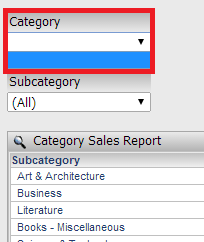
In Strategy Web 9.4.1 Hotfix 3, slice selectors can target other selectors to cascade selections before getting to an actual grid. If the selectors are of type slice, the parent selector will not show any elements when its source attribute is not included in the grid, as shown below:
 

ka04W000000Od8JQAS_0EM44000000268O.png

 
This issue only occurs when the selector is being used as slice instead of filter, and when its only target is the child selector and not the grid.
 
STEPS TO REPRODUCE:
To reproduce the issue in Strategy Tutorial, follow the directions below:

  1. Create a new document in Strategy Web 9.4.1 HF 3, using the "Category Sales Report" report as a dataset.
  2. Create a grid, and add only the "Subcategory" attribute.
  3. Create a dropdown attribute element selector, using "Subcategory" as the source and the grid as the target.
  4. From the selector properties, disable "Apply selections as filter" so that the selector is set to slice.
  5. Create a dropdown attribute element selector, using "Category" as the source and the selector from Step 3 as the target.
  6. Repeat step 4 for the new selector.
  7. Execute the document. Notice that the dropdown from the Category selector does not show any elements.

CAUSE:
This is a known issue in Strategy Web 9.4.1 Hotfix 3.  
 
ACTION:
Strategy will continue to investigate and post updates as soon as they are available.
 
WORKAROUND:
Use one of the following workarounds:

  1. Add the source attribute of the parent selector to the target grid.
  2. If the approach is not to show the source attributes in the target grid, create a separate grid with the source attributes and make it a target of the selectors. Hide the new grid behind the rest of the document objects.
  3. Use the selectors as filters instead of slice selectors.
  4. Set the grid as a target for the parent selector as well.


Comment

0 comments

Details

Knowledge Article

Published:

June 23, 2017

Last Updated:

June 23, 2017