EducationSoftwareStrategy.com
StrategyCommunity

Knowledge Base

Product

Community

Knowledge Base

TopicsBrowse ArticlesDeveloper Zone

Product

Download SoftwareProduct DocumentationSecurity Hub

Education

Tutorial VideosSolution GalleryEducation courses

Community

GuidelinesGrandmastersEvents
x_social-icon_white.svglinkedin_social-icon_white.svg
Strategy logoCommunity

© Strategy Inc. All Rights Reserved.

LegalTerms of UsePrivacy Policy
  1. Home
  2. Topics

KB46908: A transaction services document displays the value from a transaction with a manual input upon exporting to Excel, even though the label is what displays when viewed in MicroStrategy Web 9.4.1.


Community Admin

• Strategy


A transaction services document displays the value from a transaction with a manual input upon exporting to Excel, even though the label is what displays when viewed in MicroStrategy Web 9.4.1.

SYMPTOM:
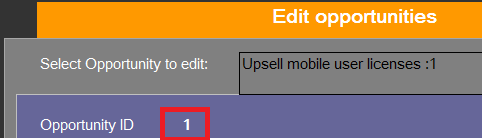
In Strategy Web 9.4.1, exporting a transaction services document to Excel before modifying its input will display the values instead of the labels for a List transaction input that is set to Manual, as shown below. 
 

ka04W000000OaTNQA0_0EM44000000268B.png

 
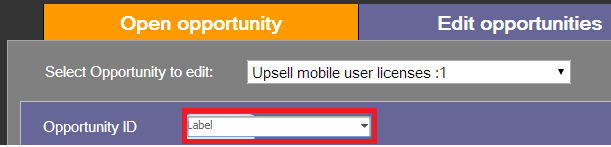
The labels display when viewed in Express mode in Strategy Web 9.4.1, like shown below.
ka04W000000OaTNQA0_0EM44000000268E.png

 
STEPS TO REPRODUCE:
 
To reproduce the issue in Strategy Tutorial, follow these steps:
  • Open the "Opportunity Management" transaction services document in Design Mode.
  • Right-click the transaction to go to "configure transaction".
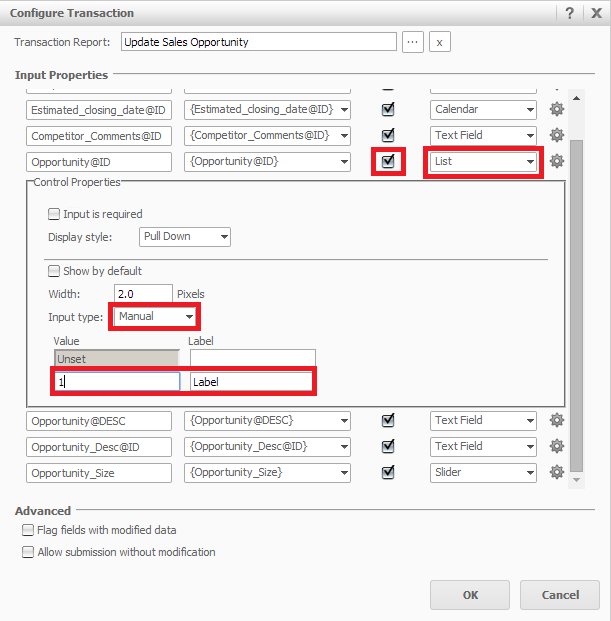
  • Locate the "Opportunity@ID" Input Properties.
  • Modify it to be Editable by enabling the checkbox next to it.
  • Set the Control Style as "List" and input Type as "Manual".
  • Set a value and a label for the manual list, as shown below:
ka04W000000OaTNQA0_0EM44000000268C.png
  • Execute the document in Express Mode. Notice that the Opportunity ID input shows the label, as shown below:
ka04W000000OaTNQA0_0EM44000000268E.png
  • Export the document to Excel. Notice that the Opportunity ID input shows the value instead of the label.

CAUSE:
 
This is working as design in Strategy Web 9.4.1. The real data that will be written to the Warehouse is the "value" and not the "label" property. So when exporting, the real data fetched is what is set in the value box, therefore, this is what is exported. A request has been logged to add the option of displaying labels instead of values upon exporting.
 
ACTION:
 
Strategy will continue to investigate and post updates as soon as they are available
 
WORKAROUND:
 
Use a dataset input type instead of a manual input type to work around this issue.


KB46908


Comment

0 comments

Details

Knowledge Article

Published:

June 15, 2017

Last Updated:

December 28, 2018