EducationSoftwareStrategy.com
StrategyCommunity

Knowledge Base

Product

Community

Knowledge Base

TopicsBrowse ArticlesDeveloper Zone

Product

Download SoftwareProduct DocumentationSecurity Hub

Education

Tutorial VideosSolution GalleryEducation courses

Community

GuidelinesGrandmastersEvents
x_social-icon_white.svglinkedin_social-icon_white.svg
Strategy logoCommunity

© Strategy Inc. All Rights Reserved.

LegalTerms of UsePrivacy Policy
  1. Home
  2. Topics

KB46919: Adding derived Metrics to a grid on a report services document containing reference to specific Attribute form which is not shown on the grid results in NULL values for the derived Metric in MicroStrategy Developer/Web 9.4.x


Stefan Zepeda

Salesforce Solutions Architect • Strategy


In MicroStrategy Web 9.4.1 derived Metric shows NULL values when the Metric definition contains a reference to an Attribute form which is not shown on the corresponding grid on a report services document.

SYMPTOM:
In Strategy Web 9.4.1 derived Metric shows NULL values when the Metric definition contains a reference to an Attribute form which is not shown on the corresponding grid on a report services document.
 
STEPS TO REPRODUCE:
Using the Strategy Tutorial sample project in Strategy Web, same applies in Strategy Developer:
  • Create a new report 'Dataset' with Attribute 'Category' in row.
  • Create a document on the report with the following properties
    1. Add a new Metric 'New Metric' with the definition Max(Category@DESC){}
    2. Add a grid with 'Category' in row and 'New Metric' in column
  • Execute the document and the expected results are shown as in the picture below:
ka02R000000kcNoQAI_0EM440000002655.jpeg
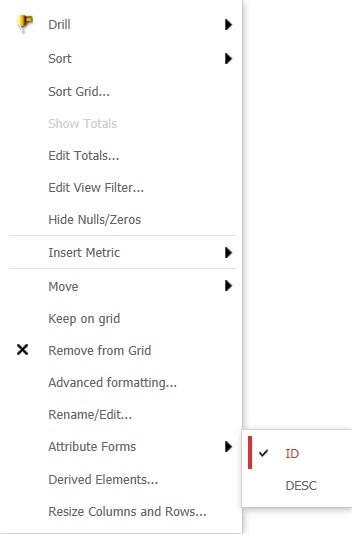
  • Right mouse click on the Attribute 'Category' and
     
    • Add the Attribute form 'ID'
    • Remove the Attribute form 'DESC'
ka02R000000kcNoQAI_0EM440000002658.jpeg
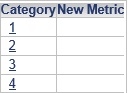
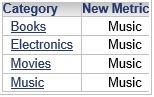
  •  The grid will show NULL values for 'New Metric'
ka02R000000kcNoQAI_0EM440000002656.jpeg

CAUSE:
This is working as designed. The 9.4.1 analytical engine uses only the forms on the grid for derived metric calculations. This is different from previous versions where the calculation was performed regardless of what was on the grid.
 
ACTION:
The 10.x Analytical Engine does the calculations for derived metrics using all the objects in the datasets used in the documents and the issue is no longer existing there. Upgrade to take advantage of the fix.
 
WORKAROUND:
Designers can add the relevant form to the grid but set its width to 0:

  1. Add the Attribute form 'DESC'
  2. Right mouse click on the Attribute 'Category'
    1. Resize Columns and Rows...
    2. Under 'Columns' chose the option 'Fixed'
    3. Search for the Attribute form 'Category DESC'
    4. Set the column width to zero

Comment

0 comments

Details

Knowledge Article

Published:

May 1, 2017

Last Updated:

May 1, 2017